sqlalchemy
SQLAlchemy
SQLAlchemy is Python’s most popular SQL toolkit and Object-Relational Mapper (ORM). DBAPI - PEP-0249, Python Database API

I recently finished reading a SQLAlchemy 2.0 book. This post is a collection of notes and examples that I want to revisit later
Setup using Docker
I used SQLAlchemy with PgSql here
services:
  db:
    image: 'postgres:17.5-alpine'
    ports:
      - '5432:5432'
    container_name: postgres-container
    environment:
      POSTGRES_DB: retrofun
      POSTGRES_USER: retrofun
      POSTGRES_PASSWORD: admin
      TZ: Asia/Kolkata
    volumes:
      - 'postgres_data:/var/lib/postgresql/data'
    restart: unless-stopped
    healthcheck:
      test:
        - CMD
        - pg_isready
        - '-p'
        - '5432'
        - '-U'
        - retrofun
      interval: 10s
      timeout: 5s
      retries: 5
  pgadmin:
    image: dpage/pgadmin4
    container_name: pgadmin_ui
    ports:
      - '8080:80'
    environment:
      - PGADMIN_DEFAULT_EMAIL=admin@admin.com
      - PGADMIN_DEFAULT_PASSWORD=admin
    volumes:
      - 'admin_data:/var/lib/pgadmin'
    depends_on:
      - db
    restart: unless-stopped
  postgresql_exporter:
    image: prometheuscommunity/postgres-exporter
    container_name: postgresl_exporter
    ports:
      - '9187:9187'
    environment:
      DATA_SOURCE_NAME: 'postgresql://retrofun:pgsadmin@db:5432/retrofun?sslmode=disable'
    depends_on:
      db:
        condition: service_healthy
    restart: unless-stopped
volumes:
  postgres_data: null
  admin_data: null
import psycopg2
conn = psycopg2.connect(host="localhost",port=5432,dbname="pgdb",user="admin",password="passwd",sslmode="disable")
cur = conn.cursor()
cur.execute("SELECT current_database();")
print(cur.fetchone())
cur.close()
conn.close()
erDiagram
    customers {
        int customer_id PK
        varchar first_name
        varchar last_name
        varchar email UK
    }

    customer_profiles {
        int profile_id PK
        int customer_id UK
        varchar phone_number
        text shipping_address
        int loyalty_points
    }

    products {
        int product_id PK
        varchar product_name
        decimal price
        int stock_quantity
    }

    orders {
        int order_id PK
        int customer_id
        timestamp order_date
        varchar status
    }

    order_items {
        int order_id PK
        int product_id PK
        int quantity
        decimal unit_price
    }

    customers ||--|| customer_profiles : "has"
    customers ||--o{ orders : "places"
    orders ||--o{ order_items : "contains"
    products ||--o{ order_items : "included in"
SQL Code:: Sample Data
    -- This script was generated by the ERD tool in pgAdmin 4.
    -- Please log an issue at https://github.com/pgadmin-org/pgadmin4/issues/new/choose if you find any bugs, including reproduction steps.
    BEGIN;
    ALTER TABLE IF EXISTS public.customer_profiles DROP CONSTRAINT IF EXISTS customer_profiles_customer_id_fkey;
    ALTER TABLE IF EXISTS public.order_items DROP CONSTRAINT IF EXISTS order_items_order_id_fkey;
    ALTER TABLE IF EXISTS public.order_items DROP CONSTRAINT IF EXISTS order_items_product_id_fkey;
    ALTER TABLE IF EXISTS public.orders DROP CONSTRAINT IF EXISTS orders_customer_id_fkey;
    DROP TABLE IF EXISTS public.customer_profiles;
    CREATE TABLE IF NOT EXISTS public.customer_profiles
    (
        profile_id serial NOT NULL,
        customer_id integer NOT NULL,
        phone_number character varying COLLATE pg_catalog."default",
        shipping_address character varying COLLATE pg_catalog."default",
        loyalty_points integer NOT NULL DEFAULT 0,
        CONSTRAINT customer_profiles_pkey PRIMARY KEY (profile_id),
        CONSTRAINT customer_profiles_customer_id_key UNIQUE (customer_id)
    );
    DROP TABLE IF EXISTS public.customers;
    CREATE TABLE IF NOT EXISTS public.customers
    (
        customer_id serial NOT NULL,
        first_name character varying COLLATE pg_catalog."default" NOT NULL,
        last_name character varying COLLATE pg_catalog."default" NOT NULL,
        email character varying COLLATE pg_catalog."default" NOT NULL,
        CONSTRAINT customers_pkey PRIMARY KEY (customer_id),
        CONSTRAINT customers_email_key UNIQUE (email)
    );
    DROP TABLE IF EXISTS public.order_items;
    CREATE TABLE IF NOT EXISTS public.order_items
    (
        order_id integer NOT NULL,
        product_id integer NOT NULL,
        quantity integer NOT NULL,
        unit_price numeric(10, 2) NOT NULL,
        CONSTRAINT order_items_pkey PRIMARY KEY (order_id, product_id)
    );
    DROP TABLE IF EXISTS public.orders;
    CREATE TABLE IF NOT EXISTS public.orders
    (
        order_id serial NOT NULL,
        customer_id integer NOT NULL,
        order_date character varying COLLATE pg_catalog."default" NOT NULL DEFAULT CURRENT_TIMESTAMP,
        status character varying COLLATE pg_catalog."default" NOT NULL DEFAULT 'Pending'::character varying,
        CONSTRAINT orders_pkey PRIMARY KEY (order_id)
    );
    DROP TABLE IF EXISTS public.products;
    CREATE TABLE IF NOT EXISTS public.products
    (
        product_id serial NOT NULL,
        product_name character varying COLLATE pg_catalog."default" NOT NULL,
        price numeric(10, 2) NOT NULL,
        stock_quantity integer NOT NULL,
        CONSTRAINT products_pkey PRIMARY KEY (product_id)
    );
    ALTER TABLE IF EXISTS public.customer_profiles
        ADD CONSTRAINT customer_profiles_customer_id_fkey FOREIGN KEY (customer_id)
        REFERENCES public.customers (customer_id) MATCH SIMPLE
        ON UPDATE NO ACTION
        ON DELETE NO ACTION;
    CREATE INDEX IF NOT EXISTS customer_profiles_customer_id_key
        ON public.customer_profiles(customer_id);
    ALTER TABLE IF EXISTS public.order_items
        ADD CONSTRAINT order_items_order_id_fkey FOREIGN KEY (order_id)
        REFERENCES public.orders (order_id) MATCH SIMPLE
        ON UPDATE NO ACTION
        ON DELETE NO ACTION;
    ALTER TABLE IF EXISTS public.order_items
        ADD CONSTRAINT order_items_product_id_fkey FOREIGN KEY (product_id)
        REFERENCES public.products (product_id) MATCH SIMPLE
        ON UPDATE NO ACTION
        ON DELETE NO ACTION;
    ALTER TABLE IF EXISTS public.orders
        ADD CONSTRAINT orders_customer_id_fkey FOREIGN KEY (customer_id)
        REFERENCES public.customers (customer_id) MATCH SIMPLE
        ON UPDATE NO ACTION
        ON DELETE NO ACTION;
    END;
  -- =========================================================
  -- 1. CUSTOMERS (base table)
  -- =========================================================
  INSERT INTO customers (
      customer_id,
      first_name,
      last_name,
      email
  )
  VALUES
    (1, 'Arun',    'Kumar',     'arun.kumar@email.com'),
    (2, 'Priya',   'Raman',     'priya.raman@email.com'),
    (3, 'Vikram',  'Subramaniam','vikram.s@email.com'),
    (4, 'Divya',   'Narayanan', 'divya.n@email.com'),
    (5,  'Karthik', 'Selvam',    'karthik.s@email.com'),
    (6,  'Meena',   'Balaji',    'meena.balaji@email.com'),
    (7,  'Suresh',  'Pandian',   'suresh.p@email.com'),
    (8,  'Lakshmi', 'Krishnan',  'lakshmi.k@email.com'),
    (9,  'Ganesh',  'Murugan',   'ganesh.m@email.com'),
    (10, 'Anitha',  'Rajendran', 'anitha.r@email.com'),
    (11, 'Deepak',  'Chandran',  'deepak.c@email.com'),
    (12, 'Kavya',   'Venkatesh', 'kavya.v@email.com'),
    (13, 'Ramesh',  'Iyer',      'ramesh.iyer@email.com'),
    (14, 'Sowmya',  'Natarajan', 'sowmya.n@email.com');
  -- =========================================================
  -- 2. CUSTOMER_PROFILES (1:1 with customers)
  -- Each customer_id appears at most once here -> enforces 1:1
  -- Note: customer 4 (Divya) intentionally has NO profile,
  -- showing that 1:1 here is "zero-or-one" on the profile side.
  -- =========================================================
  INSERT INTO customer_profiles (
    profile_id,
    customer_id,
    phone_number,
    shipping_address,
    loyalty_points
  )
  VALUES
    (101, 1, '+91-9840012345', '12 Anna Nagar, Madurai, TN',      250),
    (102, 2, '+91-9940098765', '45 Gandhi Road, Chennai, TN',     500),
    (103, 3, '+91-9791122334', '7 Mount Road, Coimbatore, TN',    120),
    (104, 5,  '+91-9843311220', '22 Kamaraj Nagar, Madurai, TN',   80),
    (105, 6,  '+91-9944455667', '9 Race Course Road, Coimbatore, TN', 340),
    (106, 7,  '+91-9788899001', '18 Bharathi Street, Trichy, TN',  0),
    (107, 8,  '+91-9600112233', '3 Nehru Street, Salem, TN',       610),
    (108, 9,  '+91-9092233445', '55 Periyar Nagar, Madurai, TN',   45),
    (109, 10, '+91-9345566778', '27 VOC Street, Tirunelveli, TN',  300),
    (110, 11, '+91-9788123456', '14 Anna Salai, Chennai, TN',      150),
    (111, 12, '+91-9445566990', '2 MG Road, Coimbatore, TN',       420),
    (112, 13, '+91-9994411223', '31 Church Road, Madurai, TN',     90),
    (113, 14, '+91-9843322110', '6 Lake View Road, Chennai, TN',   275);
  -- customer 4 has no matching row -> 1:1 relationship intact
  -- (if you inserted a second row with customer_id = 1, the
  --  UNIQUE constraint on customer_id would reject it)
  -- =========================================================
  -- 3. PRODUCTS (base table for catalog)
  -- =========================================================
  INSERT INTO products (
      product_id,
      product_name,
      price,
      stock_quantity
  )
  VALUES
      (201, 'Wireless Mouse',      499.00,  150),
      (202, 'Mechanical Keyboard', 2999.00,  80),
      (203, 'USB-C Hub',           1299.00, 200),
      (204, 'Laptop Stand',        899.00,  100),
      (205, 'Webcam 1080p',        1799.00,  60),
      (206, 'Bluetooth Speaker',   1499.00, 120),
      (207, 'External SSD 1TB',    5999.00,  50),
      (208, 'HDMI Cable 2m',        349.00, 300),
      (209, 'Gaming Mouse Pad',      399.00, 250),
      (210, 'Noise Cancelling Headphones', 4499.00, 70),
      (211, 'Portable Power Bank', 1299.00, 180),
      (212, '27-inch Monitor',    15999.00,  40),
      (213, 'Ergonomic Chair',    8999.00,   25),
      (214, 'Desk Lamp LED',       699.00,  150),
      (215, 'Wireless Charger',   1099.00,  100);
  -- =========================================================
  -- 4. ORDERS (1:Many with customers)
  -- One customer -> many orders
  -- =========================================================
  INSERT INTO orders (
    order_id,
    customer_id,
    order_date,
    status
  )
  VALUES
      (301, 1, '2026-07-01 10:15:00', 'Delivered'),
      (302, 1, '2026-07-15 14:30:00', 'Shipped'),   -- Arun's 2nd order
      (303, 2, '2026-07-10 09:00:00', 'Pending'),
      (304, 3, '2026-07-20 16:45:00', 'Delivered'),
      (305, 3, '2026-07-25 11:20:00', 'Pending'),
      (306, 5,  '2026-07-02 08:30:00', 'Delivered'),
      (307, 6,  '2026-07-05 12:00:00', 'Pending'),
      (308, 6,  '2026-07-18 17:15:00', 'Shipped'),   -- Meena's 2nd order
      (309, 7,  '2026-07-08 09:45:00', 'Delivered'),
      (310, 8,  '2026-07-11 13:20:00', 'Cancelled'),
      (311, 9,  '2026-07-14 10:10:00', 'Pending'),
      (312, 10, '2026-07-16 15:50:00', 'Delivered'),
      (313, 11, '2026-07-19 11:05:00', 'Shipped'),
      (314, 12, '2026-07-22 14:40:00', 'Pending'),
      (315, 5,  '2026-07-27 09:25:00', 'Delivered');   -- Vikram's 2nd order
  -- =========================================================
  -- 5. ORDER_ITEMS (M:N junction between orders and products)
  -- Each order can have many products, each product can appear
  -- in many orders -> classic many-to-many via junction table
  -- =========================================================
  INSERT INTO order_items (
    order_id,
    product_id,
    quantity,
    unit_price
  )
  VALUES
    (301, 201, 2, 499.00),   -- Order 301 (Arun) - buys wireless mount
    (301, 203, 1, 1299.00),  -- Order 301 (Arun) - buys hub
    (302, 202, 1, 2999.00),   -- Order 302 (Arun again) - buys keyboard
    (302, 205, 1, 1799.00),   -- Order 302 (Arun again) - buys webcam
    (303, 201, 1, 499.00),    -- Order 303 (Priya) - buys mouse
    (303, 204, 2, 899.00),    -- Order 303 (Priya) - buys stand
    (304, 202, 1, 2999.00),   -- Order 304 (Vikram) - buys keyboard (same product as order 302)
    (305, 201, 3, 499.00),    -- Order 305 (Vikram again) - buys mouse
    (305, 203, 1, 1299.00),   -- Order 305 (Vikram again) - buys hub
    (305, 204, 1, 899.00),    -- Order 305 (Vikram again) - buys stand
    (306, 206, 1, 1499.00),   -- Karthik: Bluetooth Speaker
    (307, 208, 3, 349.00),    -- Meena: HDMI cables
    (308, 210, 1, 4499.00),   -- Meena: Headphones
    (309, 207, 1, 5999.00),   -- Suresh: External SSD
    (310, 209, 2, 399.00),    -- Lakshmi: Mouse pads (order cancelled)
    (311, 211, 2, 1299.00),   -- Ganesh: Power banks
    (312, 212, 1, 15999.00),  -- Anitha: Monitor
    (313, 213, 1, 8999.00),   -- Deepak: Ergonomic chair
    (314, 214, 2, 699.00),    -- Kavya: Desk lamps
    (315, 206, 1, 1499.00);   -- Karthik again: Bluetooth Speaker (same product as order 306)
1. Connecting to the Database
The Database URL
SQLAlchemy connects to a database using a standard connection string format:
# {dialect}{+driver}://{username}:{password}@{hostname}:{port}/{database}

# Utilizing psycopg2 driver to connect to the retrofun database
url = "postgresql+psycopg2://retrofun:admin@localhost:5432/retrofun"

# Postgres
"postgresql+asyncpg://user:passwd@host/db"  # async
"postgresql+psycopg://user:passwd@host/db"  # psycopg 3 ( sync or async )
"postgresql+psycopg2://user:passwd@host/db"  # legacy sync

# SQlite
"sqlite:///app.db" # relative path
"sqlite:////home/app.db" # absolute path
"sqlite+aiosqlite:///app.db" # async
"sqlite:///:memory:" # in memory
-
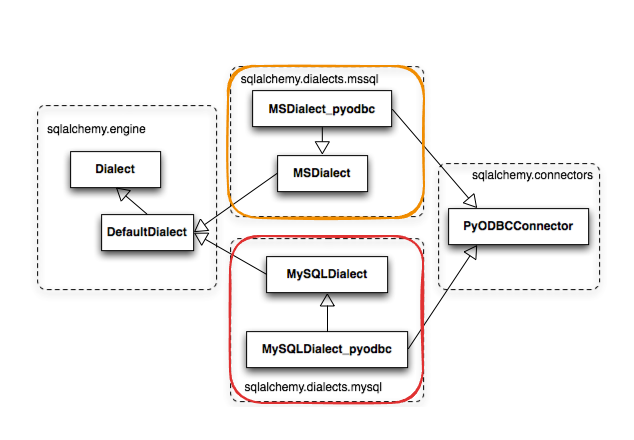
Dialect: The database system component that translates Python code into a specific database’s SQL syntax (e.g., postgresql, mysql, sqlite). like different dialect Tvl Tamil, Chennai Tamil. Everyone talks SQL but in different syntax
-
Driver: The underlying third-party Python library used to interact with the database (e.g., psycopg2)
2. Initalizing the Engine
The engine manages the SQLAlchemy connection pool and the database connection -independent SQL dialect layer. It is initialized once when the application starts using create_engine()
Engine per reqeuest ( should be process-singleton );; Sesions are per-request
import os
from dotenv import load_dotenv
from sqlalchemy import create_engine

load_dotenv()

# create_engine constructs the engine from the configuration URL
engine = create_engine(os.environ['DATABASE_URL'],pool_size=5) # pool_size=5: the number of connections to keep open inside the connection pool. This used with sqlalchemy.pool.QueuePool
from sqlalchemy import create_engine
from sqlalchemy.pool import NullPool

engine = create_engine(URL, poolclass=NullPool)    # No pool; each connection opens a fresh connection; closes it after; for serverless, connection shouldn't be reused

# single shared connection
engine = create_engine("sqlite://", poolclass=StaticPool, connect_args={'check_same_thread':False})

pgengine = create_engine(
    url=os.getenv("DATABASE_URL"),
    echo=False,  # log every SQL statement issued to the database
    echo_pool=True,  #
    pool_size=5,  # specify a custom size for the connection pool SQLAlchemy maintains
    max_overflow=5,  # the maximum number of connections above the pool size that can be created during usage spikes
    future=True,  # use sqlalchemy 2.0 API style guide
    pool_recycle=True, # Close and reopen connections after this number of seconds of inactivity, or, if -1 (the default), disable connection recycling. This is useful if the database server times out connections after a period of inactivity, as MySQL does.
    pool_timeout=30, # The number of seconds to wait when getting a connection from the pool before giving up, (applicable only to QueuePool connection pools). The default is 30.; avoid hitting DB's idle timeout ( postgres:: idle_session_timeout ) so keep less than that
)

# async default is AsyncAdaptedQueuePool
SQLAlchemy’s default strategy is to acquire a connection for each SQL statement, and when that connection is no longer used (when its result set is closed or garbage-collected), to return it to the pool
print(engine.pool.status())  # expose as prometheus gauges

engine.dispose() # close all pooled connections
3. Core vs. ORM Architecture
SQLAlchemy splits its functionality into two layers:
- SQLAlchemy Core: Contains database integration logic, dialects, table schemas, and the SQL expression language. Uses Table instances explicitly.
- SQLAlchemy ORM (Object-Relational Mapping): Adds an abstraction layer mapping Python classes directly to database tables. Database operations are derived automatically from Python objects.
Architecture Strategy: Applications can combine Core and ORM functionalities to exploit both low-level control and high-level developer efficiency.
When you work with Core, you do it with Connection, When you work with ORM use Sessions
SQLAlchemy CORE
from sqlalchemy.types import TEXT,String,Integer,BLOB,Boolean,BOOLEAN,VARBINARY,VARCHAR,Double,Date,ARRAY,DateTime,Numeric,TIMESTAMP
from sqlalchemy.sql import text
from sqlalchemy.sql.expression import insert,join,label,func,exists,cte,column,case,between
from sqlalchemy.schema import Table,Index,MetaData,Column,ForeignKey,PrimaryKeyConstraint,CheckConstraint
from sqlalchemy.sql.ddl import CreateTable
from sqlalchemy.pool import Pool,QueuePool,StaticPool,AsyncAdaptedQueuePool,NullPool
from sqlalchemy.engine import Row,URL,Result,Engine,Dialect,create_engine
from sqlalchemy.dialects.postgresql import array
from sqlalchemy.dialects import sqlite,postgresql

meta = MetaData()

customer = Table(
    "customers", # plurals
    meta,
    Column("customer_id",Integer,primary_key=True),
    Column("first_name",VARCHAR(50),nullable=False),
    Column("last_name",String(50),nullable=False),
    Column('email',String(100),nullable=False,unique=True),
    Column("last_modified", DateTime, server_default=text("NOW()"))
)
engine = create_engine("sqlite:///:memory:", echo=True)
# Create all tables defined on Base.metadata
meta.create_all(engine)
SQLAlchemy ORM
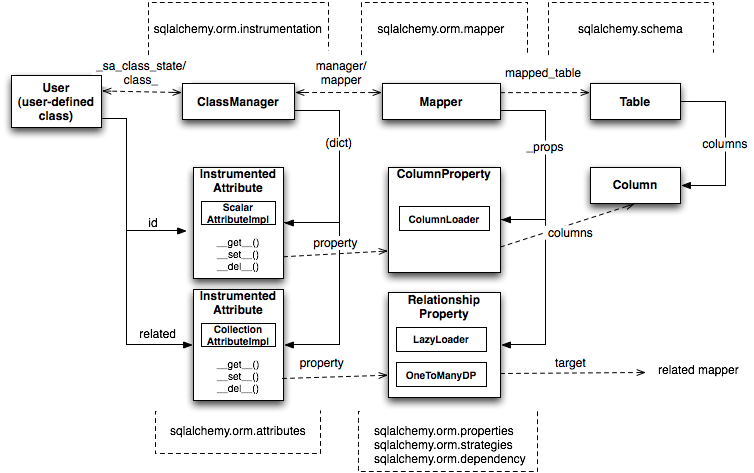
When using the ORM, database tables are defined as Python classes inheriting from a shared declarative base class.
from sqlalchemy.orm import create_session,mapped_column,backref,relationship,DeclarativeBase,Mapped,join,selectinload
from sqlalchemy.types import Numeric,DateTime
from sqlalchemy.orm.query import Query
from sqlalchemy.orm.scoping import scoped_session
from sqlalchemy.orm.session import sessionmaker,close_all_sessions
from sqlalchemy.sql import text
from sqlalchemy.schema import Table,Index,MetaData,Column,ForeignKey,PrimaryKeyConstraint,CheckConstraint
from typing import Optional

meta = MetaData()
class Base(DeclarativeBase):
    metadata = meta

class Customer(Base):
    __tablename__ = "customers" # plurals
    customer_id: Mapped[int] = mapped_column(primary_key=True)
    first_name: Mapped[str] = mapped_column(nullable=False)
    last_name: Mapped[str] = mapped_column(nullable=False)
    email: Mapped[str] = mapped_column(unique=True, nullable=False)
    profile: Mapped[Optional["CustomerProfile"]] = relationship( back_populates="customer", uselist=False ) # relationships
    orders: Mapped[list["Order"]] = relationship(back_populates="customer")
    def __repr__(self):
        return f'Customer({self.customer_id}, "{self.last_name}")'

engine = create_engine("sqlite:///:memory:", echo=True)
# Create all tables defined on Base.metadata
Base.metadata.create_all(engine)

p1 = Customer(customer_id=1,first_name="Alex",last_name="Babu",email="alexinwonderland@email.com",profile="comedian",order="123") # Std python class constructor
Conventions:
- Table Names (tablename): Plural and lowercase (e.g., ‘products’).
- Entity / Class Names: Singular and CamelCase (e.g., Product).
4. Understanding DB MetaData
MetaData acts as the application’s database blueprint. It keeps a central record of structural design features (tables, columns, constraints, foreign keys) without holding the actual underlying data.
It manages your table information, and a flexible type system for mapping SQL types to Python types.
When using DeclarativeBase, Model.metadata automatically gathers these layout blueprints as models are declared:
Model.metadata (The Blueprint)
 ├── products (Table)
 │    ├── id (Column, Primary Key)
 │    └── name (Column)
 └── users (Table)
      ├── id (Column, Primary Key)
      └── username (Column)

# , use create_all(engine) to create it
Model.metadata ──► .create_all(engine) ──► Creates SQL Tables in Database
class Product(Model):
    __tablename__ = 'products'

    id: Mapped[int] = mapped_column(primary_key=True)
    ...
    ...
    updated_date:Mapped[str]

Model.metadata.create_all(engine) # Doesn't create column as update_date
create_all() only creates tables that don’t already exist.
To recreate the table with incleded columns
# leads to Data loss
Model.metadata.drop_all(engine)
Model.metadata.create_all(engine)
Instead of deleting tables, Alembic generates migration scripts.
example migration:
ALTER TABLE products ADD COLUMN price INTEGER;
Benefits:
- keeps existing data
- tracks schema history
- allows upgrades and rollbacks
Production applications almost always use Alembic for schema changes.
Naming Conventions:
Different databases generate different names for constraints.
Instead of relying on database-generated names, define them yourself.
from sqlalchemy import MetaData
metadata = MetaData(
    naming_convention={
        "pk": "pk_%(table_name)s",
        "fk": "fk_%(table_name)s_%(column_0_name)s_%(referred_table_name)s",
    }
)
This makes migrations predictable across different databases.
Object Mapper
product = Table(
    "products",
    meta,
    Column("product_id", Integer, primary_key=True),
    Column("product_name", String(100), nullable=False),
    Column("price", Numeric(10, 2), nullable=False),
    Column("stock_quantity", Integer, nullable=False),
    Column("image",ImageType,nullable=True),
    Column("last_modified", DateTime, server_default=text("NOW()")),
)

class Product(Base):
    __tablename__ = "products"

    product_id: Mapped[int] = mapped_column(primary_key=True)
    product_name: Mapped[str] = mapped_column(nullable=False)       # Not Null;;; <default=None>
    price: Mapped[float] = mapped_column(Numeric(10, 2), nullable=False)
    stock_quantity: Mapped[int] = mapped_column(nullable=False)

    order_items: Mapped[list["OrderItem"]] = relationship(back_populates="product")
Defaults
# runs at orm-level
create_at: Mapped[datetime] = mapped_column(default=datetime.utcnow)
# DB side;; DDL; preferred for consistency
create_at: Mapped[datetime] = mapped_column(server_default=func.now())

# on update;; runs on update via orm
updated_at:Mapped[datetime] = mapped_column(onupdate=datetime.utcnow)
Primary Key
import uuid
from sqlalchemy import Uuid
class Doc(Base):
    id:Mapped[uuid.Uuid] = mapped_column(Uuid(as_uuid=True),primary_key=True,default=uuid.uuid4)
Foreign Key
class Order(Base):
    __tablename__ = "orders"

    order_id: Mapped[int] = mapped_column(primary_key=True)
    customer_id: Mapped[int] = mapped_column(ForeignKey("customers.customer_id"), nullable=False, ondelete='CASCADE')
ondelete:: CASCADE, SET NULL, RESTRICT, NO ACTION
Index and Constraints and Generated
from decimal import Decimal
from sqlalchemy import Computed
class OrderItem(Base):
    __tablename__ = "order_items"
    __table_args__ = (
      CheckConstraint("quantity > 0", name="ck_order_items_quantity_positive"),
      Index("ix_order_product", "order_id", "product_id")
    )
    order_id: Mapped[int] = mapped_column(ForeignKey("orders.order_id"), primary_key=True)
    product_id: Mapped[int] = mapped_column(ForeignKey("products.product_id"), primary_key=True)
    quantity: Mapped[int] = mapped_column(nullable=False)
    unit_price: Mapped[Decimal] = mapped_column(Numeric(10, 2), nullable=False)
    total_price: Mappeed[Decimal] = mapped_column( Numeric(10, 2),Computed("quantity * unit_price"),persisted=True)

    order: Mapped["Order"] = relationship(back_populates="items")
    product: Mapped["Product"] = relationship(back_populates="order_items")
Enum
import enum
from sqlalchemy.sql.sqltypes import JSON,Enum as SAEnum

class Role(str,enum.Enum):
  USER = 'user'
  ADMIN = 'admin'

class User(Base):
  role:Mapped[Role] = mapped_column(SAEnum(Role))
JSON
from sqlalchemy.sql.sqltypes import JSON,Enum
from sqlalchemy.dialects.postgresql import JSONB

class Event(Base):
  payload:Mapped[dict] = mapped_column(JSON)
Type Decorator
class ImageType(TypeDecorator):
    impl = LargeBinary
    cache_ok = True

    def process_bind_param(self, value, dialect):
        if value is None: return None

        if not isinstance(value, Image.Image): raise TypeError("Expected a PIL.Image.Image instance")

        buffer = BytesIO()
        value.save(buffer, format="JPEG")
        return buffer.getvalue()

    def process_result_value(self, value, dialect):
        if value is None: return None

        buffer = BytesIO(value)
        image = Image.open(buffer)
        image.load()  # Fully load the image before the buffer is discarded
        return image
Inheritance Mapping
from sqlalchemy import Column, Integer, String, Float
from sqlalchemy.orm import DeclarativeBase, Session
from sqlalchemy.sql.schema import MetaData
from sqlalchemy.engine import create_engine

meta = MetaData(
    naming_convention={
        "ix": "ix_%(column_0_label)s",
        "uq": "uq_%(table_name)s_%(column_0_name)s",
        "ck": "ck_%(table_name)s_%(constraint_name)s",
        "fk": "fk_%(table_name)s_%(column_0_name)s_%(referred_table_name)s",
        "pk": "pk_%(table_name)s",
    }
)
class Base(DeclarativeBase):
    metadata = meta
class Employee(Base):
    __tablename__ = "employees"
    id = Column(Integer, primary_key=True)
    name = Column(String)
    type = Column(String)
    __mapper_args__ = {"polymorphic_identity": "employee", "polymorphic_on": type}
class Manager(Employee):
    salary = Column(Float)
    __mapper_args__ = {"polymorphic_identity": "manager"}
class Engineer(Employee):
    hourly_rate = Column(Float)
    __mapper_args__ = {"polymorphic_identity": "engineer"}

if __name__=='__main__':
    pgengine = create_engine("sqlite:///:memory:",connect_args={'check_same_thread':False},echo="debug")
    Base.metadata.create_all(pgengine)
    with Session(pgengine) as session:
        manager = Manager(name="Alice",salary=85000,)
        session.add(manager)
        session.commit()
        print(f"{manager.id=}")

    with Session(pgengine) as session:
        engineer = Engineer(name="Bob",hourly_rate=55,)
        session.add(engineer)
        session.commit()
        print(f"{engineer.id=}")

    with Session(pgengine) as session:
        engineer = session.get(Engineer, 2)
        engineer.hourly_rate = 70
        session.commit()

    with Session(pgengine) as session:
        employees = session.query(Employee).all()
        for emp in employees: print(f"{emp.id=}", f"{emp.name=}", type(emp).__name__)

    with Session(pgengine) as session:
        managers = session.query(Manager).all()
        for manager in managers: print(f"{manager.name=}", f"{manager.salary=}")
5. Session and sessionmaker
A Session is your application’s workspace or transaction window to the database. It handles the lifecycle of your Python objects and translates your operations into SQL queries.
from sqlalchemy.orm import sessionmaker, Session

SessionLocal = sessionmaker(engine, expire_on_commit=False) # for web-app once session expires return on pool, till that not-expire

def SessionLocal() as session:
    try:
      session.add(order)
      session.flush() # SQL insert runs; order_id set
      session.commit() # commited

      # session.add_all([order1,order2,order3])
    except IntegrityError:
      session.rollback()
re-attach detached object
sticker = Product(product_name= "naruto-sticker",price= 10,stock_quantity=1)
session.merge(sticker)
with session.no_autoflash:
  # query sess uncommitted inserts
  ...
The Unit of Work Pattern: The session keeps track of every object you create, modify, or delete. It doesn’t instantly send everything to the database; it holds them in memory until you flush or commit.
Short-Lived: A session is designed to be transient. You open it, execute a specific batch of work (like handling a single web request), and close it.
In Code How Works Together
import os
from sqlalchemy import create_engine
from sqlalchemy.orm import sessionmaker
import atexit


@atexit.register
def shutdown():
    print("Closing database connection pool...")

# App Lifecycle Global Closures
engine = None
Session = None

def init():
    """Executes ONCE when the process spins up."""
    global engine, Session

    # Configure the engine alongside its implicit connection pool
    engine = create_engine(
        os.environ['DATABASE_URL'],
        pool_size=20,         # Keeps 20 active connections permanently warm
        max_overflow=10       # Allocates up to 10 additional burst connections
    )

    # Establish a reusable factory template for creating light Session instances
    Session = sessionmaker(bind=engine)


def run(request_data):
    """Executes on EVERY high-throughput request."""
    # 1. Allocate an isolated session context
    with Session() as session:
        # 2. Open a precise transactional boundary
        with session.begin():  # Safely auto-commits on success or auto-rolls back on error
            # Perform atomic data adjustments here
            # e.g., product = session.get(Product, request_data['id'])
            pass

    # 3. Context manager automatically closes the session.
    # The network connection safely returns straight back to the engine's pool.
events
from sqlalchemy import event

@event.listens_for(engine,"connect")
def on_connect(dpapi_conn, conn_record):
  # runs when a new physical connection is made
  ...

@event.listens_for(engine,"checkout")
def on_checkout(dpapi_conn, conn_record, conn_proxy):
  # runs every time a connecttion is borrows from pool
  ...

@event.listens_for(engine,"before_execute")
def before_execute(conn, clauseelement, multiparams, params, execution_options):
  # before each statement
  ...
Transaction & Concurrency
Partitioning Strategies
SQL Write up
from sqlalchemy.sql import select,or_,and_,not_,func,exists,update,delete,insert,union,except_,any_,join,cte,all_,between,case,cast
Follows SQLAlchemy 2.0 Style as using Context Manager way (recommended)
session = Session() # avoid

with Session() as session:
  ...
0. Execute RAW SQL
with engine.begin() as conn: # opens raw sql connection
    res = conn.execute(statement=text("""SELECT current_database();"""))
    print(f"current_db:: {res.scalar()}")
# Open Connection + Active Transaction + auto-commit + rollback if fails
with session.begin():
  res = session.execute(text("SELECT current_database();"))
  print(f"current_db: {res.scalar()}")
1. Query
from sqlalchemy import select
q = select(Product)  # Represents: SELECT * FROM products
print(q)

q = select(Product.name, Product.manufacturer)  # Selective Column queries
| Method | Returns | Behavior |
|---|---|---|
session.execute(q) |
Result iterator | Returns rows as tuples (even for single-column queries). |
.all() |
List | Pulls all remaining rows into a list. |
.first() |
First row / None |
Returns the first row; discards any remaining results. |
.one() |
First row | Returns exactly one row. Raises an exception if 0 or more than 1 row exists. |
.one_or_none() |
First row / None |
Returns one row or None. Raises an exception if more than 1 row exists. |
session.scalars(q) |
Scalar result iterator | Convenience wrapper that unwraps single-element tuples into raw values. |
2. Filtering
select(Product).where(Product.manufacturer == 'Commodore').where(condition2)

# or
.where(condition1,condition2)


from sqlalchemy import or_, and_, not_
select(Product).where(or_(Product.year < 1970, Product.year > 1990))
3. Sorting
.order_by()
.order_by(Product.year.desc())
.order_by(Product.year.asc())
5. Aggregation, Groupby
SQL Functions sqlalchemy.func
6. Pagination
7. Searching
Product.name.like('%Sinclair%')  # case-sensitive
Product.name.ilike('%sinclair%') # insensitive
Product.year.between(1970, 1979)   # between
Relationships
One-to-One Relationship
One-to-Many Relationship
Many-to-Many Relationship
Asynchronous SQLAlchemy
# url
"postgresql+asyncpg://user:passwd@host/db"  # async
"sqlite+aiosqlite:///app.db" # asyncs
# async default is AsyncAdaptedQueuePool
from sqlalchemy.ext.asyncio.engine import create_async_engine,AsyncEngine
engine = create_async_engine(url= , connect_args={'server_settings':{'timezone':"UTC"}, "statement_cache_size":1000})


async with engine.connect() as conn:                # raw connnection; no-autocommit
  result = await conn.execute(text("SELECT 1;"))

async with engine.begin() as conn:                  # autocommit on exit
  result = await conn.execute(text("SELECT 1;"))
Async Streaming
result = await session.stream(select(Event))
async for evt in result,scalers():
  proces(evt)


async with engine.connect() as conn:
  results = await conn.steam(select(event_table))
  async for row in results:
    ...
SQLAlchemy and Web
# fastpi
@asynccontextmanger
async def lifespan(app):
  app.state.engine = create_async_engine(URL,pool_size=20,pool_pre_ping=True)
  app.state.sm = async_sessionmaker(app.state.engine,expire_on_commit=False)
  yield
  await app.state.engine.dispose()

async def get_db(request:Request)->AsyncSession:
  async with request.app.state.sm() as session:
    yield session
from sqlalchemy import create_engine, text, MetaData, Table, Column, Integer, String, insert, ForeignKey
from sqlalchemy.orm import declarative_base, sessionmaker, relationship  # use classe that transalte to Table
#
sqlite_engine = create_engine('sqlite:///peoples.db',echo=True)
#
psql_engine = create_engine('postgresql+psycopg2://postgres:postgres@localhost:5432/peoplesdb',echo=True)


result = engine.execute("select 'hello world'")
print(result.fetchall())

with engine.connect() as conn:
  result = conn.execute(text("select 'hello world'"))
  print(result.all())


# Creation Meta Data
meta = MetaData()

people = Table("people", meta, Column('id',Integer,primary_key=True), Column('name',String,nullable=False), Column('age',Integer))
meta.create_all(engine)

#
Alembic
Introduction
Why it is exists and what it solves?
Concepts
alembic init scaffolding a migration environment
Migration scripts upgrade() and downgrade()
RevisionIDs
Autogenerate
Config files
Working as team (Branching/Merging migration)
SQL Injection Attacks
SQLAlchemy Philosophy
SQL databases behave less and less like object collections the more size and performance
start to matter; object collections behave less and less like tables and rows the more
abstraction starts to matter. SQLAlchemy aims to accommodate both of these principles.
Note:
sizing:
total_connections = workers x replica x ( pool_size + max_overflow )
Postgres max_connections defaults to 100.
Recommendations:
- 4 workers x 5 replicas x (10+10) = 400 -> too many for default postgres
-
use PgBouncer in transaction-pool mode for multiplex
- Multiple engine
write_engine = create_async_engine(url,pool_size=20)
reader_engine = create_async_engine(url,pool_size=40,connect_args={'server_settings':{"default_transaction_read_only":"on"}})