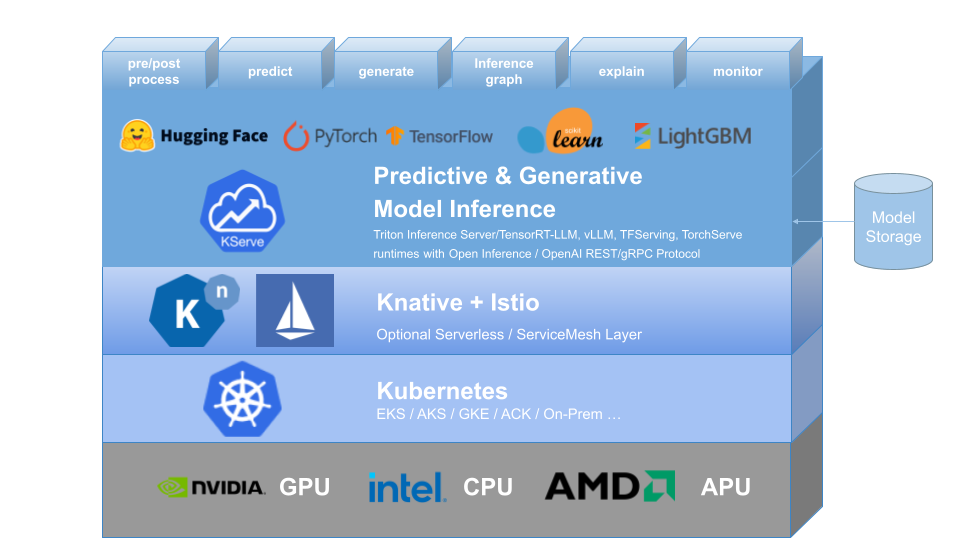
Service Mesh
WIP
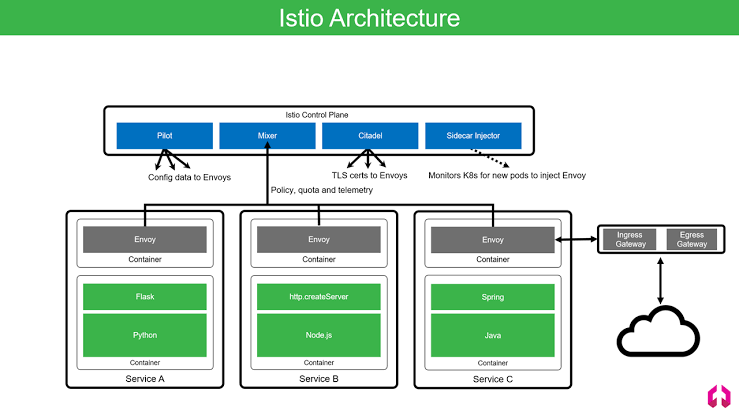
Istiod = Citadel + Pilot + Galley
- Citadel:: Manages certificate generation; assigns SPIFFE identities to enable secure communication
- Pilot:: distributes the validated networking configuration to each Envoy; Helps Service Discovery
- Galley:: Helps in validating incoming config files
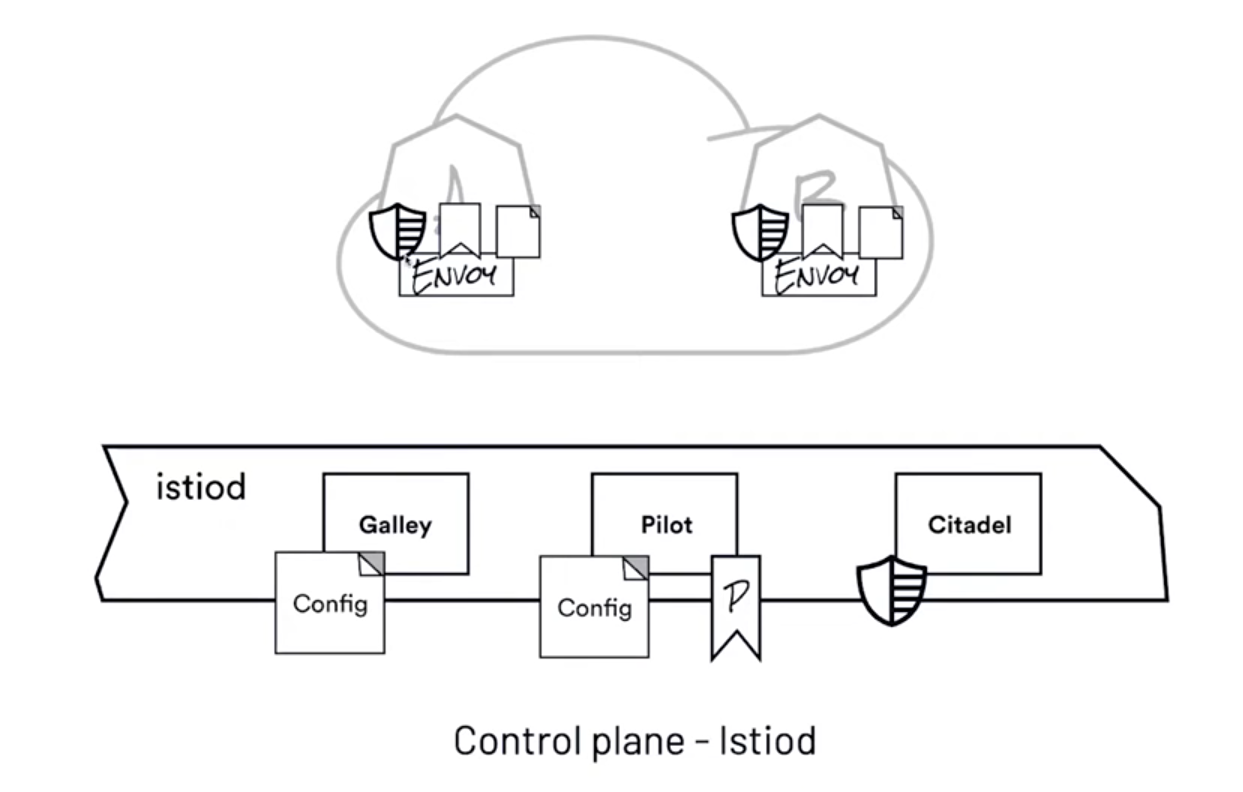
Benefits:
- Istio can run on a variety of platforms like Kubernetes, Mesos, Nomad & Consul etc.
- Istio simplifies service-to-service network operations like traffic management, authorization, and encryption etc. also provides tracing, monitoring, and logging features as well
Installation
- Install with Istioctl
curl -L https://istio.io/downloadIstio | sh - cd istio-1.30.3 export PATH=$PWD/bin:$PATH - Istio Operator Install
- Install with Helm
```sh
helm repo add istio https://istio-release.storage.googleapis.com/charts
helm repo update
helm install istio-base istio/base -n istio-system –set defaultRevision=default –create-namespace
helm status istio-base -n istio-system
helm get all istio-base -n istio-system
helm ls -n istio-system
Istio comes with different [profiles](https://istio.io/latest/docs/setup/additional-setup/config-profiles/#deployment-profiles); demo profile includes istio-ingress, istio-egress and istiod


```sh
istioctl install --set profile=demo -y
# - Istio-Ingressgateway
# - Istiod ( Pilot + Citadel + Galley )
# - Istio-Egressgateway

istioctl verify-install  # Shows Deployment, Roles, ServiceAccount, Service...etc

kubectl get pods -n istio-system
# - istio-egressgateway
# - istio-ingressgateway
# - istiod-865dcc765c
kubectl api-resources -o wide | grep istio
istioctl version
# starts with Side Cart Mode
kubectl label namespace default istio-injection=enabled #
istioctl analyze
kubectl get namespace default --show-labels
Sample Application
kubectl apply -f samples/booksinfo/platform/kube/bookinfo.yaml
kubectl get pods
Visualize with Kiali
kubectl apply -f samples/addons # install grafana, zipkin, kiali, loki jaeger
kubectl rollout status deployment/kiali -n istio-system

kubectl apply -f istio-1.20.8/samples/bookinfo/networking/bookinfo-gateway.yaml
# Redis Master Deployment
apiVersion: apps/v1
kind: Deployment
metadata:
  name: redis-master
  labels:
    app: redis
    role: master
    version: "v2.8.22"
spec:
  replicas: 1
  selector:
    matchLabels:
      app: redis
      role: master
  template:
    metadata:
      labels:
        app: redis
        role: master
        version: "v2.8.22"
    spec:
      containers:
      - name: redis-master
        image: redis:2.8.22
        ports:
        - name: redis-server
          containerPort: 6379
---
apiVersion: v1
kind: Service
metadata:
  name: redis-master
  labels:
    app: redis
    role: master
spec:
  ports:
  - port: 6379
    targetPort: redis-server
  selector:
    app: redis
    role: master

---
# Redis Slave
apiVersion: apps/v1
kind: Deployment
metadata:
  name: redis-slave
  labels:
    app: redis
    role: slave
    version: "v2.8.22"
spec:
  replicas: 2
  selector:
    matchLabels:
      app: redis
      role: slave
  template:
    metadata:
      labels:
        app: redis
        role: slave
        version: "v2.8.22"
    spec:
      containers:
      - name: redis-slave
        image: ibmcom/guestbook-redis-slave:v2
        ports:
        - name: redis-server
          containerPort: 6379
---
apiVersion: v1
kind: Service
metadata:
  name: redis-slave
  labels:
    app: redis
    role: slave
spec:
  ports:
  - port: 6379
    targetPort: redis-server
  selector:
    app: redis
    role: slave
kubectl -n istio-system get svc istio-ingressgateway
kubectl -n istio-system get svc istio-ingressgateway -o jsonpath='{.spec.ports[?(@.name=="http2")].nodePort}'
kubectl -n istio-system get svc kiali
istioctl dashboard kiali
---
apiVersion: v1
kind: Service
metadata:
  labels:
    app: kiali
    app.kubernetes.io/instance: kiali
    app.kubernetes.io/managed-by: Helm
    app.kubernetes.io/name: kiali
    app.kubernetes.io/part-of: kiali
    app.kubernetes.io/version: v1.63.1
    helm.sh/chart: kiali-server-1.63.1
    version: v1.63.1
  name: kiali
  namespace: istio-system
spec:
  type: NodePort
  ports:
  - appProtocol: http
    name: http
    port: 20001
    protocol: TCP
    targetPort: 20001
    nodePort: 30007
  - appProtocol: http
    name: http-metrics
    port: 9090
    protocol: TCP
    targetPort: 9090
    nodePort: 30008
  selector:
    app.kubernetes.io/instance: kiali
    app.kubernetes.io/name: kiali
---
apiVersion: v1
kind: Service
metadata:
  labels:
    component: server
    app: prometheus-svc
    release: prometheus
    chart: prometheus-15.9.0
    heritage: Helm
  name: prometheus
  namespace: istio-system
spec:
  ports:
    - name: http
      port: 9090
      protocol: TCP
      targetPort: 9090
      nodePort: 30009
  selector:
    component: "server"
    app: "prometheus"
    release: "prometheus"
  type: NodePort
istioctl kube-inject -f YOUR_POD_DEFINITION.yaml

kubectl get mutatingwebhookconfigurations.admissionregistraion.k8s.io
# istalled as part of istio; and it'll istall side-car
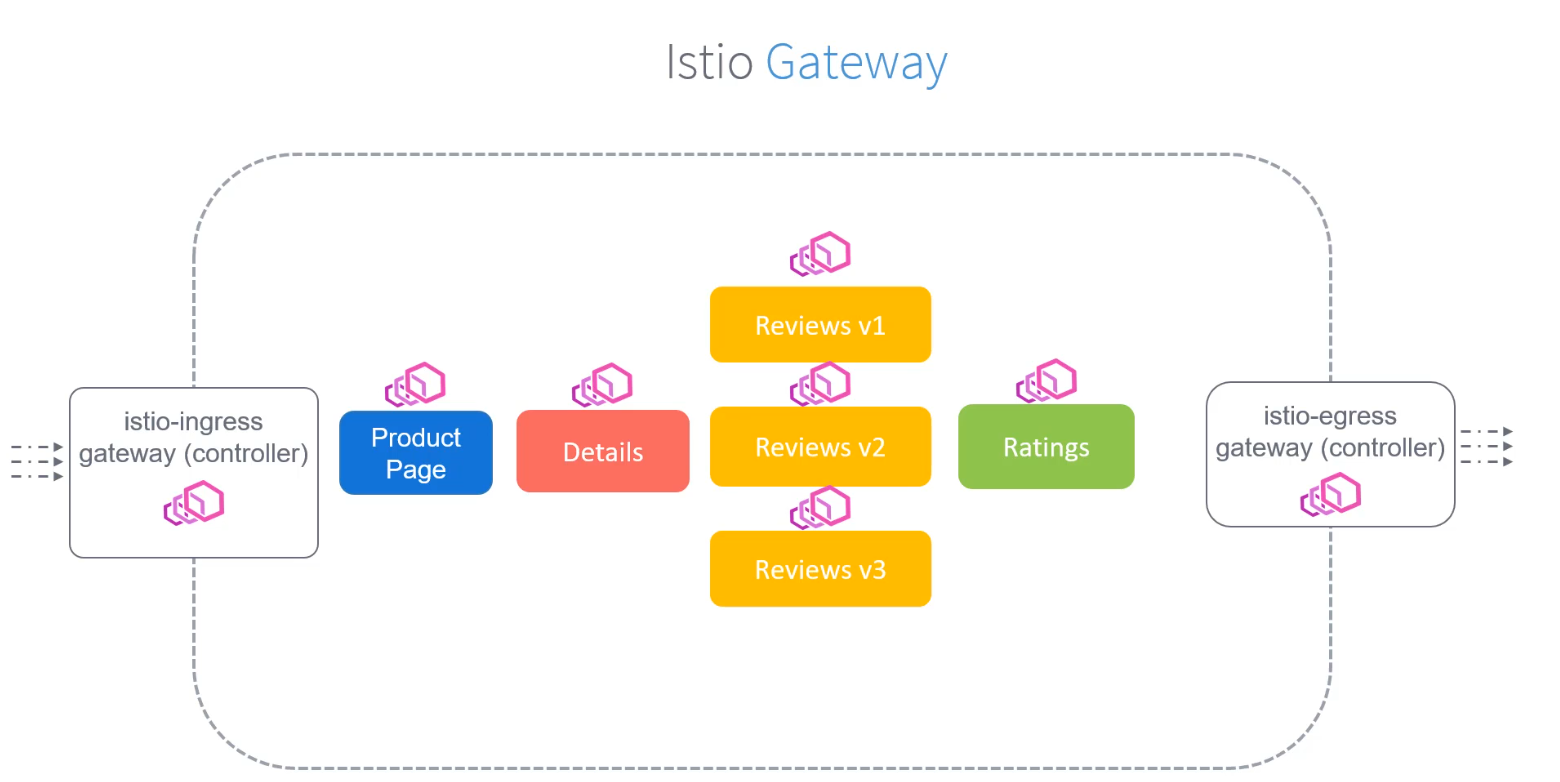
Istio Ingress
Configuring Ingress = Find the Gateway Resource + Route the traffic that hits the Gateway
kubectl get svc -n istio-namespace # LoadBalancer
kubectl -n istio-system get svc istio-ingressgateway -o jsonpath=’{.status.loadBalancer.ingress[0].ip}’
# Nginx Ingress
apiVersion: networking.k8s.io/v1beta1
kind: Ingress
metadata:
  name: ingress
spec:
  rules:
  - host: bookinfo.app
    http:
      paths:
      - path: /
        backend:
          serviceName: productpage
          servicePort: 8000
do curl on the gatway :( no response
apiVersion:
kind:
metadata:
  name:
spec:
  # this configuration is for ingressgateway pod
  selector:
    istio: ingressgateway
  # below is configuration
  servers:
  - port:
      number: 80
      name: http
      protocol: HTTP
    hosts:
    - "bookinfo.app"
do curl on gateway :( but got response as no routes I go follow on
Virutal Services
apiVersion: networking.istio.io/v1alpha3
kind: VirtualService
metadata:
  name: bookinfo
spec:
  hosts:
  - "bookinfo.app"
  gateways:
  - bookinfo-gateway
  http:
    - match:
      - uri:
          exact: /productpage
    - uri:
        prefix: /static
    - uri:
        exact: /login
    - uri:
        exact: /logout
    - uri:
        prefix: /api/v1/products
    route:
    - destination:
        host: productpage  # pod-name  or # fqdn
        subset:
        - name: v1 # versions v1, v2, v3
          labels:
            version: v1  # pod labels
        port:
          number: 9080
        weight: 100
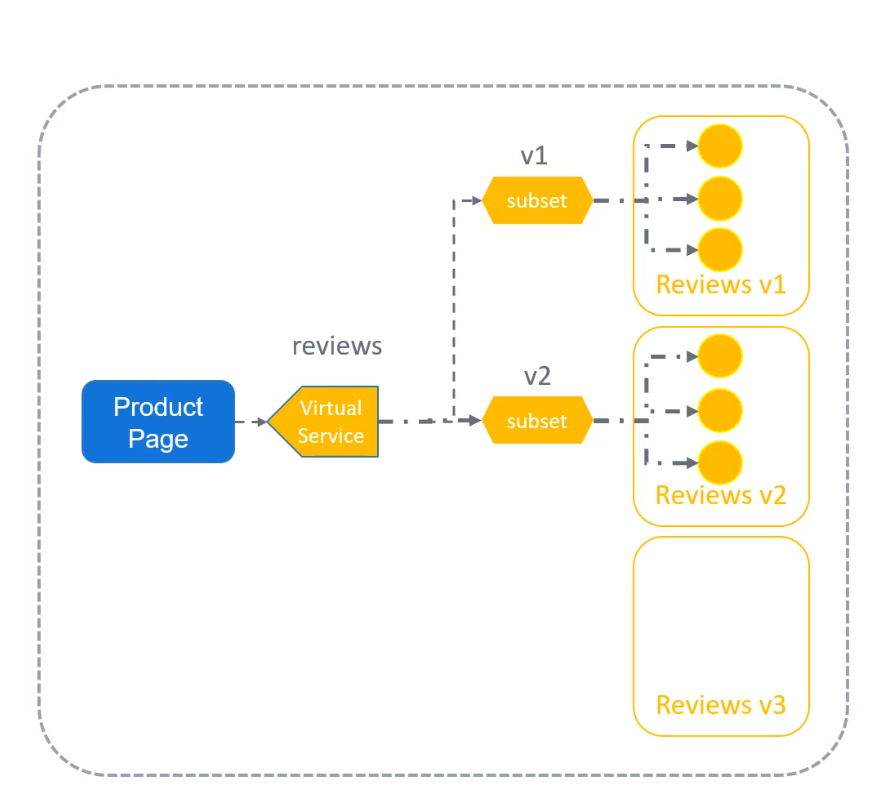
destination rules get applied after routing
how to see FQDN
kubectl exec -it
kubectl get vs # virtual services
kubectl get svc -A # Check External Ip