CoreDNS
CoreDNS
was started by Miek Gieben as a fork of the Caddy web server’s DNS features. The goal was to create a modern, extensible DNS server written in the Go programming language.
| Year | Event |
|---|---|
| 2016 | CoreDNS project started |
| 2017 | Accepted into Cloud Native Computing Foundation (CNCF) |
| 2019 | Graduated from CNCF |
| Present | Default DNS server for Kubernetes |
The Plugin-Based Design Philosophy
CoreDNS is built on a simple yet powerful idea borrowed from the Unix philosophy: everything is a plugin.
Unlike traditional, monolithic DNS servers where all features are baked into one large application, CoreDNS provides a simple core server whose only job is to route DNS queries through a series of plugins. Each plugin is designed to do one specific thing and do it well.
Key Benefits
- Flexible: You only use and enable the features you need.
- Secure: A smaller codebase with fewer running features reduces the potential attack surface.
- Extensible: Adding new functionality is as simple as writing a new plugin.
Why CoreDNS? The Cloud-Native Advantage
CoreDNS excels in modern, dynamic cloud-native environments due to three key advantages:
- Extensibility for Service Discovery: Unlike traditional DNS servers built for static IPs, CoreDNS uses plugins to integrate directly with APIs. The kubernetes plugin automatically updates DNS records as services are created, scaled, or moved.
- Simplicity and Performance: It features a single, readable Corefile configuration and a lightweight binary with a low memory footprint and high performance capabilities.
- Kubernetes Standard: As the default DNS provider for Kubernetes, CoreDNS knowledge is essential for cloud-native work.
The Core Architecture: A Chain of Plugins
The CoreDNS server itself does very little. Its main job is to receive a DNS query and pass it down a “plugin chain”. Each plugin in the chain is a self-contained piece of code that performs one specific task.
How a Query Flows Through CoreDNS
Imagine an assembly line for building a car. Each station does one specific job.
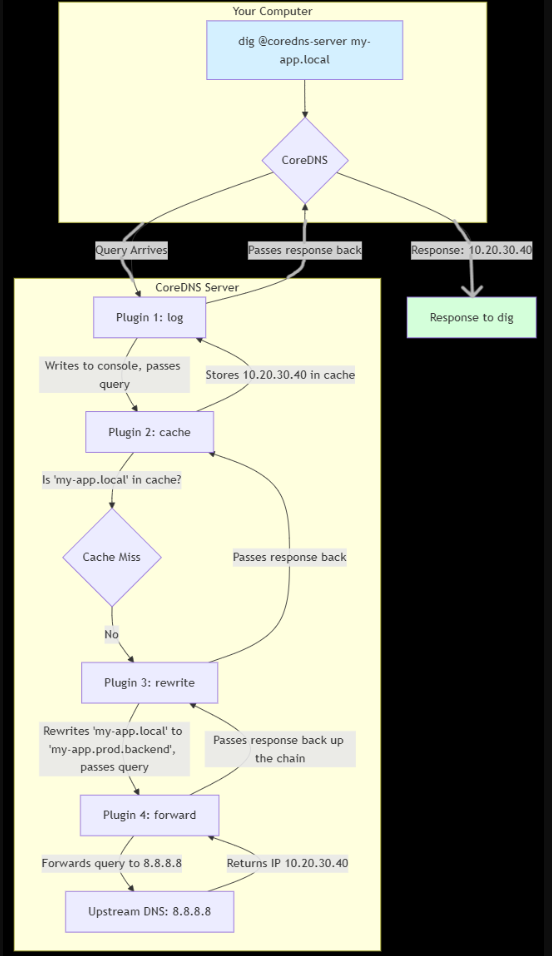
- A DNS query arrives at the CoreDNS server.
- CoreDNS hands the query to the first plugin in the chain defined in the Corefile.
- That plugin inspects the query and decides what to do:
- Handle it: If the plugin can answer the query (e.g., the cache plugin finds the answer in its cache), it does so and the process stops.
- Modify it: The plugin might change the query (e.g., the rewrite plugin) and then pass it to the next plugin in the chain.
- Ignore it: If the plugin can’t handle the query, it simply passes it to the next plugin.
- This continues down the chain until a plugin handles the query or the chain ends.
NOTE: The order of plugins in your Corefile matters immensely! If a plugin handles a query early in the chain, subsequent plugins will never see it.
The Flowchart above shows a typical flow. A query first goes to the log plugin (which logs every query), then to the cache (to check for a cached answer), then to rewrite (to potentially block a domain), and finally to forward to ask an upstream resolver like Google’s 8.8.8.8. The first plugin to provide a definitive answer stops the chain.
Example Corefile
my-app.local {
    log
    cache
    rewrite name my-app.local my-app.prod.backend
    forward . 8.8.8.8
}
CoreDNS vs. BIND: The Need for a New Approach
| Feature | CoreDNS | BIND |
|---|---|---|
| Configuration | Corefile: Simple, human-readable | named.conf & Zone Files: Complex syntax |
| Architecture | Plugin-Based: Highly modular | Monolithic: Single large application |
| Extensibility | Easy: Write plugins in Go | Difficult: Complex C codebase |
| Primary Use | Case Cloud-Native & Service Discovery | Traditional Authoritative DNS |
| Resource Usage | Lightweight: Smaller footprint | Heavier: More resource-intensive |
In Summary:
BIND is like a battleship—powerful, feature-rich, and the standard for traditional, authoritative DNS for static zones. It has been battle-tested for decades.
CoreDNS is like a set of high-tech LEGOs—you pick the exact pieces (plugins) you need to build the DNS server you want. This makes it incredibly flexible and ideal for today’s dynamic, API-driven infrastructure.
Installing CoreDN
# Download CoreDNS
curl -LO https://github.com/coredns/coredns/releases/download/v1.12.3/coredns_1.12.3_linux_amd64.tgz

# Extract the binary
tar -xvzf coredns_1.12.3_linux_amd64.tgz

# Move to system path
sudo mv coredns /usr/local/bin/

# Make the binary executable
sudo chmod +x /usr/local/bin/coredns

# Verify installation
coredns -version
coredns -plugins
./coredns -dns.port=1053
dig @localhost -p 1053 a whoami.example.org
coredns plugins
    - acl
    - any
    - auto
    - autopath
    - azure
    - bind
    - bufsize
    - cache
    - cancel
    - chaos
    - clouddns
    - debug
    - dns64
    - dnssec
    - dnstap
    - erratic
    - errors
    - etcd
    - file
    - forward
    - geoip
    - grpc
    - header
    - health
    - hosts
    - k8s_external
    - kubernetes
    - loadbalance
    - local
    - log
    - loop
    - metadata
    - minimal
    - multisocket
    - nsid
    - pprof
    - prometheus
    - quic
    - ready
    - reload
    - rewrite
    - root
    - route53
    - secondary
    - sign
    - template
    - timeouts
    - tls
    - trace
    - transfer
    - tsig
    - view
    - whoami
    - on
Components
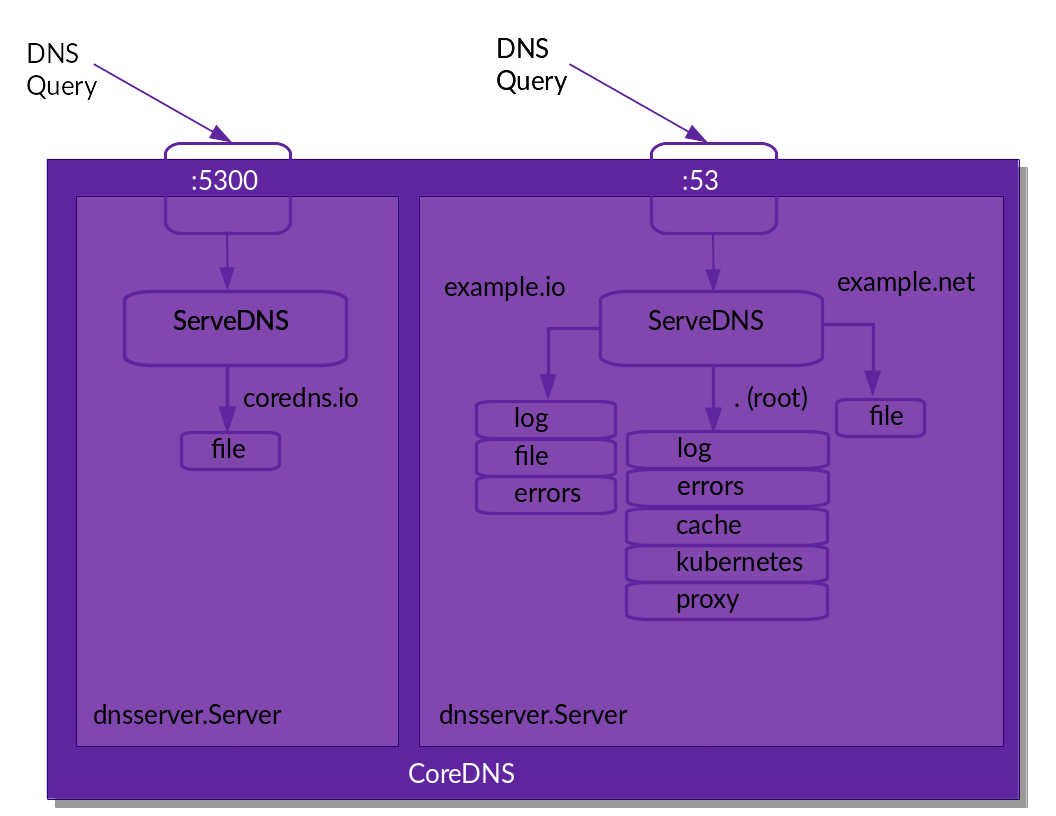
Corefile is the central configuration file for CoreDNS. defines how CoreDNS behaves, specifying which plugins to use and how to handle DNS queries for different zones.
Corefile
The Corefile serves as the primary configuration file for CoreDNS, structured into server blocks, each defined by its respective zones and ports. In this scenario, the server block is denoted as .:53, signifying its role in listening for DNS queries across all zones (.) on the standard DNS port, 53.
Within this server block, you will find a series of plugins, each specified on a separate line. CoreDNS processes these plugins sequentially to manage incoming queries:
- log: This plugin activates logging for every DNS query received by the server. It is essential for debugging and monitoring, as it captures each request and response.
- errors: The errors plugin ensures that any encountered DNS errors are logged to the standard output, facilitating quick diagnosis of configuration issues or problems with upstream servers.
- cache: The cache plugin stores DNS responses to enhance the speed of subsequent lookups. When a query is issued, CoreDNS first checks its cache. If a stored answer is available, it returns the result immediately, thereby minimizing latency and reducing external network traffic.
- forward . 8.8.8.8 8.8.4.4: The forward plugin directs unresolved queries to designated upstream DNS servers.
The period (.) indicates that this rule pertains to all zones, meaning it applies to any queries not managed by a preceding plugin.
The IP addresses 8.8.8.8 and 8.8.4.4 represent the upstream DNS servers. CoreDNS will forward any queries it cannot resolve locally to these servers to obtain the appropriate response.
In summary, this Corefile configures a CoreDNS server that listens on port 53, logs all activities and errors, caches responses to enhance performance, and forwards any unresolved queries to Google’s public DNS servers.
# /etc/coredns/db.example.local
$TTL 3600
@       IN      SOA     ns1.internal.network. hostmaster.internal.network. (
                        2023010101      ; serial
                        3600            ; refresh
                        1800            ; retry
                        604800          ; expire
                        86400 )         ; minimum
@       IN      NS      ns1.internal.network.
ns1     IN      A       127.0.0.1
api     IN      A       10.0.0.200
example.local:53 {
    file /etc/coredns/db.example.local{
        fallthrough
    }
    forward . 10.0.0.1
    log
    errors
    cache
}
.:1054 {
    bind lo
    whoami
}
.:53 {
    kubernetes
    forward . 8.8.8.8
    log
    errors
    cache
}
systemctl restart coredns

dig @127.0.0.1 google.com
dig @127.0.0.1 -p 5300 example.local
Plugins
.:53 {
    log
    errors
    cache

    etcd {
        path /skydns
        endpoint http://127.0.0.1:2379
        fallthrough
    }
    loadbalance

    rewrite name search.local google.com   # forward to google.com if search.local dns query
    forward . 8.8.8.8                      # forward to public domain resolver
}