Bash Scripting
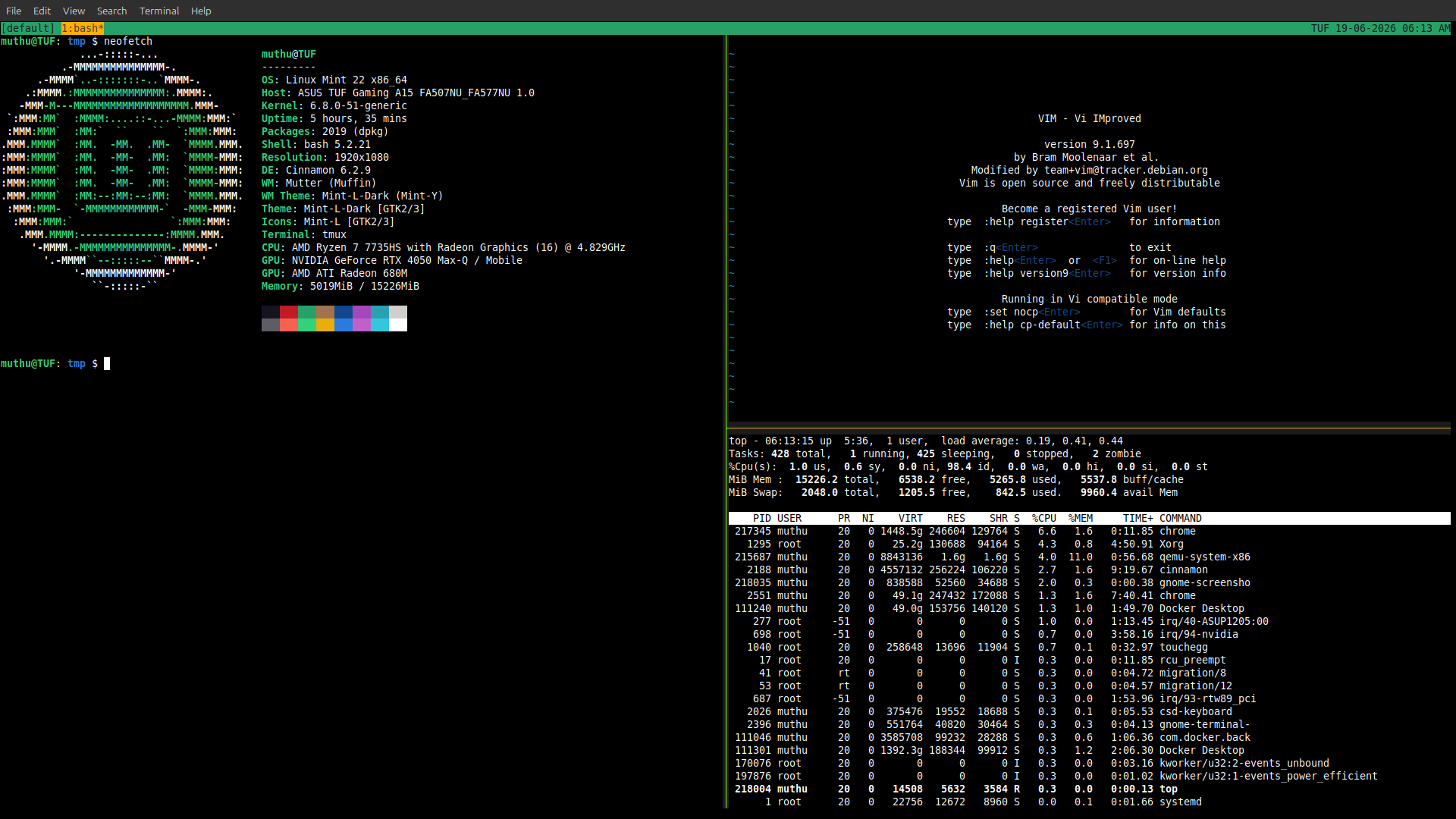
Bash - the REPL Shell
Bash is REPL: [Read Eval Print Loop]
You type text, Bash reads it, evaluates it as code, prints the result, then waits for more. This tiny loop quietly runs half the modern internet.
Terminal Basics
The terminal is your cmd to the operating system. These commands let you look around, move through directories, and create, inspect, or modify files without a GUI. Mastering these primitives turns the shell from a typing exercise into a precise navigation and file-manipulation tool
ls -lah                         # list all files and dir in current folder
pwd                             # write pathfile of current folder
touch filename.extension        # create file
rm -i file                      # interactively remove from system. os.Remove(file)
mkdir -pv dirname               # make folder
rmdir -pv dirnam                # remove folder
cd destination_place            # change current directory => destination_place
cat -n filename                 # print it in console
head -n num_of_lines filename
tail -n num_of_lines filename
echo hello world > file.txt     # redirect/overwrite in the file
echo "bye" >> file.txt          # append file
Searching Text with grep
grepsearches text using patterns, not just plain words. It scans line by line and prints only the lines that match. This makes it one of the most powerful tools for exploring logs, configs, and source code—especially when combined with regular expressions
grep -A1 pattern file               # 1 line after
grep -B1 pattern file               # 1 line before
grep -C2 pattern file               # Context ( 2 Line )
grep -i pattern file                # ignore case-sensitive
grep -o '^.' file                   # starts with single line
grep '^starts_with' file
grep 'ends_with$' file
grep 'regex-pattern' filename
grep -o '^dog' filename              # first starts with ^cat of each line
cat README.md | grep -i "pattern"
paging the file
Paging tools let you view large files one screen at a time instead of dumping everything into the terminal at once. They’re essential when reading logs, manuals, or command output that doesn’t fit on a single screen.
less filename   # less is more :)
more filename
Command Introspection
Command introspection helps you answer a deceptively important question: what exactly is Bash running when you type a command?
A name might resolve to a builtin, an alias, a keyword, or an external binary—and knowing which one you’re invoking prevents subtle surprises.
compgen -b > builtins_cmd.txt  # list all building commands
compgen -a                     # alias
compgen -k                     # bash keywords

which cmd
type -a cmd  # shows builtin/alias/hashed/bin-address
file *
Environment & Identity
The shell runs inside a context
# environment path
echo $PATH | tr : '\n'  # translate old new
echo $PWD
echo $MACHTYPE
echo -n $HOSTNAME       # no new-line at end
whoami
uname -a
Variable & Command Subsitutions
Variables store text values, and command substitution lets you capture the output of a command as a value.
# init variable
AWS_S3="sk-12345"  # Always DOUBLE QUOTE the variable
echo "$AWS_S3"

AWS_USER=`uname -a`        # Old School way of command substitution
AWS_USER=$(uname -m)       # Best Pratice of command substitution/ preferred
echo "$AWS_USER, and password $AWS_S3"
File Permission
Every file in Unix has an access contract: who can read it, who can modify it, and who can execute it. File permissions enforce that contract, and the shell gives you direct control over it.
# File Permission
# permission ? owned-by group file-size modified-date dir/file
file filename
chmod +x file  # change permission of the file to executable mode.
chmod 755 file
Shebang & Exit Code
#!/usr/bin/bash
echo $?                # check any error in the last cmd run
SHELL        = /usr/bin/bash
.SHELLFLAGS := -eu -o pipefail -c
PYTHON      ?= $(shell command -v python3 || command -v python)
PIP          = $(PYTHON) -m pip
Input
read first_name last_name
> Linux love bash

read -r variable_address
> voc nagar

read -rp "Enter your linux OS: " name
> Arch

read -rsp "Password: " os_password
> *****

echo "$first_name, $last_name"  # Linux, love bash
echo "$variable_address"        # voc nagar
echo "$name"                    # Arch
echo "$os_password"             # *****
# Postional Params as Input
# $0   # Script name
# $1   # first args
# $2   # seconda arg
# $@   # all args (safe)
# $*   # all args (unsafe)
# $#   # args count
Conditional
#!/usr/bin/bash
if [[ -n $1 ]]; then        #help '[['      #$1   <Second argment while calling script>
    echo "Hi, $1"
else
    # read only one line
    read -rp "Enter your name: " stdin        # -r means raw-string; -p prompt
    echo "hello, $stdin"
fi

help '['   # test
help '[['
help let
# [[ -a ]]                      True if file exists
# [[ -d FILE ]]                 True if file is a directory.
# [[ -e FILE ]]                 True if file exists.
# [[ -f FILE ]]                 True if file exists and is a regular file.
# [[ FILE1 -nt FILE2 ]]         True if file1 is newer than file2 (according to modification date).
# [[ FILE1 -ot FILE2 ]]         True if file1 is older than file2
# [[ -z STRING ]]               True if string is empty.
# [[ -n STRING ]]               True if string is not empty.
# [[  STRING1 = STRING2 ]]      True if the strings are equal.
# [[ STRING1 != STRING2 ]]      True if the strings are not equal.
# [[ STRING1 < STRING2 ]]       True if STRING1 sorts before STRING2 lexicographically.
# [[ STRING1 > STRING2 ]]       True if STRING1 sorts after STRING2 lexicographically.
# [[ ! EXPR ]]                  True if expr is false.
# [[ EXPR1 -a EXPR2 ]]          True if both expr1 AND expr2 are true.
# [[ EXPR1 -o EXPR2 ]]          True if either expr1 OR expr2 is true.
Tests & Comparisons
#!/bin/bash
a=2
b=2
if [[ $a == $b ]]; then
    echo 'a and b are same'
fi

c=3
d=4
if [[ $c != $d ]]; then
    echo 'c and d are not same'
fi

if ! [[ $c ==$d ]]; then
    echo 'C and D are not same'
fi

if [[ -f file.txt ]]; then
    echo "file.txt exists and is a file"
else
    echo "file.txt not exists"
fi
true   # $? => 0
false  # $? => 1
Case statement
#!/usr/bin/bash
s=$1
case "$s" in
    girl)
        echo Hello, Girl
        ;;
    boy)
        echo  Hello, boy
        ;;
    kamal* | rev*)
        echo there, you are
        ;;
    lo*)
        echo anything starts with love
        ;&                                  # fall-through
    love)
        echo love is all
        ;;
    *)
        echo "Hello $1"
        ;;
esac
Control Flow & Loops
#!/usr/bin/bash
for i in "0", "muthu", kamalan; do   # For loop
    echo "i: $i"
done

for i in "$1","$2","$3","$@"; do   # For loop
    echo "i: $i"
done

while [[ -f file.txt ]]; do
    echo "file.txt exists"
    sleep 1
done

for i in {a..f};do           # [a,b,c,d,e,f]
    echo "count, $i"
done

for i in {1..5};do           # [1,2,3,4,5]
    echo "count, $i"
done

max=5
for ((i=0;i<max; i++)); do
    echo "count, $i"
done
Function & Scope
#!/usr/bin/bash

greet(){
    local name=$1              # by-default, global variable
    echo "hello, $name from function"
}

for name in "$@"; do
    greet "$name"
done
#!/usr/bin/bash
hello(){
    local s=$1
    echo "hello, $s!"
    return 0
}
goodbye(){
    local s=$1
    echo "goodbye, $s!" > &1
}


# IO Redirections:: stdin,stdout, stderr
cat missingfile 2> error.txt  # to redirect error msg
cat missingfile 2>  /dev/null #  throw to black whole
# help '(('
# $# tells number of args
# &0  stdin
# &1  stdout
# &2  stderr
if (($#==0)); then
    echo 'name required! >&2'
    exit 1
fi
for name in "$@"; do
    if  [[ $name == m* ]]; then
        hello "$name"
    elif [[ $name == k* ]]; then
        hello "$name"
    else
        goodbye "$name"
    fi
done
Reading Files Safely
#!/usr/bin/bash
read -rp "Enter your name: " word
echo "single word: $word"


# sometime use `echo -n ???` new line won't populate so we use `[[ -n $line ]]`
while read -r line || [[ -n $line ]]; do         # read from file line by line
    :
done

help : # Null command
Indexed Array
#!/bin/bash
declare -a array=(
    muthu
    revathi
    "voc nagar"
    kovilpatti
)
echo "${array[0]}"
echo "${array[1]}"
echo "${array[2]}"
echo "${array[-1]}"
echo "${array[-2]}"
echo "${array[2000000]}"  # returns "\n"

idx=2
echo "idx: ${array[idx]}"      # valid
echo "idx: ${array[$idx]}"

echo "using *: ${array[*]}"    # stringfy
echo "using @ : ${array[@]}"


for item in "${array[*]}"; do
    echo "item in * is: $item"
done


for item in "${array[@]}"; do
    echo "item in @ is: $item"
done

members="${array[@]}"  # stringfy and copy it  # WRONG WAY to do it
family=( "${array[@]}" mariappan lakshmi )
family+=(rajapaul priya)
for m in "${family[@]}"; do
    echo "item is: $m"
done

declare -p family


alliswell=([0]="atom" [27]="muthu" [24]="revathi")
echo "${alliswell[@]}"
echo "${#alliswell[@]}"  # length of an array
Associative Array
#!/usr/bin/bash
if ! declare -A fam; then
    echo "not able to make it" >&2
    exit 1
fi
declare -A fam
fam[husband]="kamalan"
fam[wife]="revathi"

echo "${fam[husband]}"
echo "${fam[wife]}"

echo "values: ${fam[@]}"
echo "keys: ${!fam[@]}"

echo "stringfy: ${fam[*]}"
echo "length: ${#fam[@]}"

for key in "${!fam[@]}"; do
    val=${fam[$key]}
    echo "key, $key got value $val"
done
IFS variable
Internal Field Separator, and it tells Bash how to split text into pieces.
#!/bin/bash
declare -a fam=(
    "kamalan"
    "revathi"
    "voc nagar"
)
echo "stringfy: ${fam[*]}"
IFS=,
echo "stringfy with ",": ${fam[*]}"
(
    # sub shell / local scope
    IFS=\"
    echo "stringfy with \": ${fam[*]}"
)
(
    # sub shell / locl scope
    IFS=!
    echo "stringfy with !: ${fam[*]}"
)
echo "stringfy: ${fam[*]}"
command subsitituion vs Same Shell
#!/bin/bash
i=100
say_hi(){
    i=6 # local scope
    echo "hi, max-score $i"
}
hello=$(say_hi)                # runs in sub-shell
echo "Greeting and $hello, there"
echo "i is $i"                 # global scope
#!/bin/bash
i=100
say_hi(){
    i=6 # local scope
    echo "hi, max-score $i"
}
say_hi                         # runs in same-shell
echo "Greeting and $hello, there"
echo "i is $i"                 # global scope
Arithmetic expression
#!/usr/bin/bash
a=100000
b=100
echo $(( $a*$a ))  # EXPRESSION
(( max = a > b ? a : b ))
echo "$max"
echo "$(( "word"*2 ))" # => 0
help let

a=010  #Octa
echo "$a"
echo $(( 10#$a ))
process subsitution
#!/usr/bin/bash
i=0
while read -r word; do
    echo "$word"
    ((i++))
done < <(grep d /usr/file.txt)
(

# NOTE: `<(grep d /usr/file.txt)` is a file
# NOTE: `read` #read it in streaming mode
# File descriptor: A file descriptor in Linux (or Unix-like systems) is a small non-negative integer that a process uses as a handle to access an open file or I/O resource.  :: <()
file descriptor in C program
#include <unistd.h>   // read, close
#include <fcntl.h>    // open
#include <stdio.h>    // perror
int main() {
    char buffer[10];
    int fd = open("LICENsSE", O_RDONLY);
    printf("File descriptor returned by open(): %d\n", fd);
    if (fd < 0) {
        perror("open");
        return 1;
    }
    int bytes_read = read(fd, buffer, sizeof(buffer));
    if (bytes_read < 0) {
        perror("read");
        close(fd);
        return 1;
    }
    write(1, buffer, bytes_read);  // write to stdout (fd 1)
    close(fd);
    write(1, "\n", 1);
    return 0;
}
#!/usr/bin/bash
# NOTE:
shift # means move 2nd argument to 1st   $2->$1
Text Processing: cut, tr, awk, sed
#!/usr/bin/bash
cat <<EOF > file.csv
name,age,city,capital
kamalan,27,kvp,chennai
revathi,24,cvp,"chennai, TN"
EOF

cat file.csv | tr , "\t"       # translate , => \t
cat file.csv | cut -d , -f 1-2,4-  # cut it by delimeter , and get field of column 1   <index by 1>
#!/usr/bin/bash
man 5 passwd
#        •   login name
#        •   optional encrypted password
#        •   numerical user ID
#        •   numerical group ID
#        •   user name or comment field
#        •   user home directory
#        •   optional user command interpreter
cat /etc/passwd | cut -d : -f 1,3,4 # print only login name
# TODO
cat /etc/passwd | awk -F: '{ print $1, $7 }'
cat /etc/passwd | awk -F: '{ printf("name: %s\n",$1 ); }'
cat /etc/passwd | awk -F: ' $1=="root" { printf("name: %s\n",$1 ); }'

cat /etc/passwd | awk -F: '{ printf("%s\n",$1 ); }' | sort | uniq | wc -l

wc -l # lines
wc -w # words
wc -c
#!/usr/bin/bash
declare -A shells
while IFS=: read -r name pass uid gid gecos home shell; do
    #
    if [[ $name == '#'* ]]; then
        continue
    fi
    shells[$name]=$shell
    echo "$name has the shell: ${shells[$name]}"
done < /etc/passwd

declare -p shells
Finding Files
Note: Use find with -exec for bulk operations
find location -type f # check only file
find location -type f -name '*.md' # check only file
find location -type d # check only file
find location -type l # check only symlinks

find location -type f -name '*.md'  -exec echo I found a file {} \;   # execute will run cmd on streaming/one-by-one
find location -type f -name '*.md'  -exec echo I found a file {} ';'
find location -type f -name '*.md' | xargs                             # batch it

find location -type f -name '*.md' -print0 | xargs -0                 # separate null to new lines
locate --help
Debug mode
PS4='[debug]: ' bash -x script.sh
bash -n script.sh                      # syntax check
bash -u script.sh                      # check for undefined variable
sellcheck script.sh
#!/usr/bin/bash
set -x
....                   # part of the section runs on debug mode
....
set +x
Pipestatus
#!usr/bin/bash
cat file_not_exists.txt | tr , "\t"
echo "${PIPESTATUS[*]}"

true| false | true| false
echo "${PIPESTATUS[*]}"
# Each command in a pipeline gets its own exit code.
Timing command
time <--->
real  # wall clock
user  # how much time it waits in user space
sys   # how much time it waits in sys space
Sourcing File
#  Create and populate into a file
cat <<EOF > /tmp/greeetings.sh
#!/bin/usr/bash
greet(){
    # run in local so don't mess with global scope
    local name=$1
    echo "hi, $name"
}

bye()(
    # runs in sub-shell
    name=$1
    echo "bye, $name"
)

if ! (return 2>/dev/null); then
    # we are being called directly similar to if __name__=="__main__":
    greet test1
    bye test2

EOF

cat <<EOF > /tmp/test.sh
#!/usr/bin/bash
source /tmp/greeetings.sh || exit 1
greet muthukamalan
bye revathi
EOF

chmod +x /tmp/greeetings.sh
chmod +x /tmp/test.sh
bash /tmp/test.sh
params expansion
name="mutHu kamaLan"
echo "$name"
echo "name: ${name}"
echo "substring: ${name:0: -3}" # :- will take precedence as default value subsitution


echo "name with capital letter: ${name^}"
echo "name with caps all: ${name^^}"
echo "name with caps all: ${name@U}"
echo "name with cap 1st A: ${name^a}"
echo "name with cap all A:${name^^a}"
echo "name with cap all M,K: ${name^^[mk]}"
echo "${name,}"
echo "${name,,[mk]}"


echo "replace a with u: ${name/u/a}"
echo "replace a with u: ${name//u/a}"
echo "replace a with uh: ${name//[uh]/a}"
echo "replace with ____ ${name//[uh]/__&__}"
echo "replace with & ${name//[uh]/__\&__}"

path=$(pwd)
dirname $path
basename $path
echo "${path}"
echo "${path#*/}"      # from the beginning
echo "${path##*/}"     # from the beginning but find last occurance
echo "${path%/*}"      # from the end pick 1st / occurance <print "starting to /">
echo "${path%/*}"
#!/usr/bin/bash
name=${1:-default_val}       # default value
echo "name: ${name}"
echo -e "hello,\t${name}"
echo -e "hello,\v${name}"
echo -e "hello,\b${name}"

useros=${1:-$USER}     # default assing if not passing
echo "hello, $useros!"

useros=${1:?'You must pass name'}         # show error if not passing
echo "hello, $useros!"
#!/usr/bin/bash
s="muthukamalan"
len=${#s}

for ((i=0;i<len;i++)); do
    c=${s:i:1}
    echo "$c"
done
Array Expansion
#!/usr/bin/bash
fam=( kamalan revathi "voc nagar" )
printf '%s\n' "${fam[@]}"
printf '%s\n' "${fam[@]:2}"
printf '%s\n' "${fam[@]1:2}"
printf '%s\n' "${fam[@]//'voc'/'cvp'}"
(IFS=,; echo "${fam[*]}")
Globbing
ls -1 ./*.md
ls -1 ./*.??

shopt extglob
shopt -s extglob  # turn on
shopt -u extglob  # turn off

ls -1 ./!(*.md)
ls -1 ./*.+(yml|md)
#/usr/bin/bash
 touch {foo,bar,baz}.{jpg,txt}
printf "<%s>\n" **/*
echo {100..50..2}
seq 1 20
seq 10
brace Expansion
#/usr/bin/bash
printf '%s\n' {cvp,tn,india}
printf '%s\n' "{cvp,tn,india}"
printf '%s\n' tmp/files/{cvp,tn,india}.{jpg,txt}
printf '%s\n' tmp/files/*.{jpg,txt}

fname="pl-"
place=( "$fname."{txt,jpg,mov} )
for i in "${place[@]}"; do
    echo "$i"
done
printf
#!/usr/bin/bash

# printf supports  csndiouxXeEfFgGaA
printf '<%-5s> %10s\n' hello, world
printf '%*s  %5s\n' 100 hello, world
printf '%d\n' 100
printf '%05d\n' 100
printf '%05d\n' error #=> error

printf -v x 'hello, %s' world!
echo $x  # "hello, world!"
Date
date
date +%s  # strftime
datefmt='%Y-%m-%d %H:%M:%S'
printf '%(%Y-%m-%d %H:%M:%S)T\n'

printf '%(%Y-%m-%d %H:%M:%S)T  name=%2s\n' -1 muthu  # -1 represent last word
SSH Hardening
# Edit SSH config
sudo vim /etc/ssh/sshd_config
# Set: PermitRootLogin no, Port 2222
sudo systemctl reload sshd

# Key-based auth
ssh-keygen -t rsa -b 4096
ssh-copy-id devops@server
Trap Signals
trap -l
#!/usr/bin/bash
cleanup(){
    echo cleanup function running
    exit 0
}
trap cleanup exit           # On exit signal, cleanup fn will  run  similar to defer()

echo script starting....
echo ....
echo script done!
#!/usr/bin/bash
debuggs(){
    echo "[debug] running: $BASH_COMMAND"   # similar to "bash -x script"
    exit 0
}
trap debuggs debug
echo script starting....
echo ....
echo script done!
Permissions
#!/usr/bin/bash
**********

# * d/-  # directory or file
# ***  read write execute rwx  # owner
# *** # group
# *** # everyone
LC_COLLATE=C ls -alh --group-directories-first --color=auto #list all in the current dir. LC_COLLATE=C set of rule recognizing only the US English alphabet — "a-z" and "A-Z" — as "letters", and sorting by byte value
Logs, Monitoring and Troubleshooting
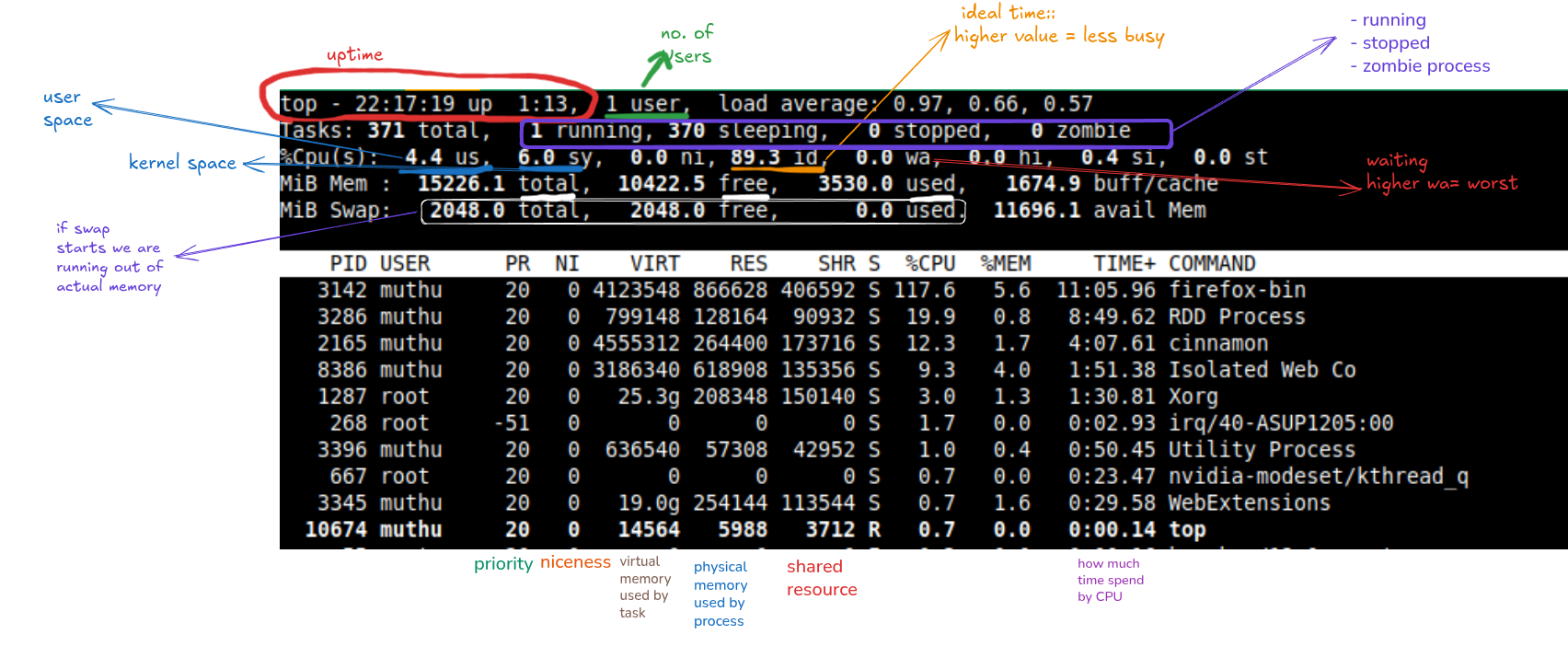
top
htop
uptime
w
lscpu # system's CPU in use
# Architecture:             x86_64
# Socket(s):                1      sockets are physical slots on motherboard where we can insert physical cpu. Socket enables communication between two process
# Core(s) per socket:       8      each socket will have 8 cores
# Thread(s) per core:       2      each core will run 2 threads at the same time

# So, Total number of virtual CPU = Sockets x Cores x Threads
# CPU(s):                    16

lsmem --summary
free -g

lshw                    # List Hardware

du -lsh filename        # size of the file
du -sh /var/*  # disk usage
File compression
tar -cf file.tar f1 f2 f3   # *.tar called as tarballs  -c:create -f:name-of-file
tar -tf file.tar            # see content of tarball
tar -xf file.tar            # extract content
tar -zcf file.tar f1 f2 f3  # compress tarball to reduce size
Check Service and manage daemin
systemctl --help
systemctl list-units --all --type= # service, socket path
systemctl list-dependencies

if systemctl is-active --quiet nginx; then echo "Nginx is running"; fi


# Service logs
dmesg | tail  # Kernel messages
journalctl -xb  # Boot logs
journalctl u nginx
journalctl #  use journalctl to view and follow the system's journald log entries, which resides in /run/log/journal.


runlevel # 5:: Boots into graphical interface and 3:: No-GUI
systemctl get-default  # graphical.target
# runlevel 0 -> poweroff.target
# runlevel 1 -> rescue.target
# runlevel 2 -> multi-user.target
# runlevel 3 -> multi-user.target
# runlevel 4 -> multi-user.target
# runlevel 5 -> graphical.target
# runlevel 6 -> reboot.target


# Run a process in background
nohup python3 app.py
./script.sh &


# Kill process
kill 1234         # By PID
killall python3   # By name
pkill -f "app.py" # By pattern
Network Essentials
hostname        # managed under /etc/hostname
hostnamectl     # /etc/hosts

ping -c4 google.com  # ping utility helps for connectivity checking

ip route #
info ip
ss -tulp
netstat -tunpl
lsof
lsof -i :80 # find process y port
lspci # list all pci cards like ethernet card, video cards (peripheral component interconnect)


lsblk # list all physical disks space <sda> and partitions are sda1,sda2,sda3..

# Trace route
traceroute google.com
mtr --report google.com  # Real-time

# View network interfaces
ip addr show
ip link show
Processes
# List the current active process with their statuses, numbers, resource usage, etc.
ps auxc   #  # All processes
ps -ef | grep nginx # Filter By Name
fg
jobs
bg #%id
CRON
crontab -l
crontab -e
# *seconds(0-59) *min(0-59) *hour(0-23) *day-of-month(1-31) *month(1-12) *day-of-week(0-7:: sunday=0 or 7) *year[optional]  *cmd
# 0 5 * * * /usr/bin/backup.sh

# Alternative systemd.timers
Service management with SYSTEMD
Systemd Tools
- Systemctl
- journelctl
# Systemctl
- Mange system state
- start/stop/restart/reload
- enable/disable
- list and manage units
- list and update targets
journalctl
journalctl -b # logs for current boot
journalctl -u UNIT # particular unit
# It should created in /etc/systemd/system/servicename.service

[Unit]
Description=Postgresql for Py3
Documentation=http://github.com/muthu/postgresql
After=postgresql.service

[Service]
ExecStart= /bin/bash /usr/bin/filename.sh
User=
Restart=on-failure
RestartSec=10

[Install]
WantedBy graphical.target   #systemctl get-default

# starts with following `systemctl start servicename.service`
# check the status `systemctl status servicename.service`
# Stop the service `systemctl stop servicename.service`
# reload services `systemctl daemon-reload`
Storage in Linux
# - Disk partitions
lsblk
fdisk -l /dev/sda

df -h # check disk usage

# Parition Types:- Primary, Extended and Logical
# Parition Schema:- MBR(old), GPT(new:: unlimited partition, no-max size)
# gdisk /dev/diskname
# LOG ROTATE
sudo vim /etc/logrotate.d/myapp
# Add:
/var/log/myapp/*.log {
    daily
    rotate 7
    compress
}
# Create partition
sudo parted /dev/sdb mklabel gpt
sudo parted /dev/sdb mkpart primary ext4 0% 100%

# Create filesystem
sudo mkfs.ext4 -L Data /dev/sdb1

# Mount filesystem
sudo mkdir /data
sudo mount /dev/sdb1 /data
echo "UUID=$(sudo blkid -s UUID -o value /dev/sdb1) /data ext4 defaults 0 2" | sudo tee -a /etc/fstab

# Create LVM
sudo pvcreate /dev/sdb1
sudo vgcreate vg_data /dev/sdb1
sudo lvcreate -L 10G -n lv_web vg_data
sudo mkfs.ext4 /dev/vg_data/lv_web
sudo mount /dev/vg_data/lv_web /var/www

# Create RAID
sudo mdadm --create /dev/md0 --level=1 --raid-devices=2 /dev/sdb1 /dev/sdc1
sudo mkfs.ext4 /dev/md0
sudo mount /dev/md0 /mnt/raid
Create and Managing Users
# create user
sudo useradd -m -s /bin/bash devops  # With home dir and shell
sudo passwd devops  # Set password

# Create group
sudo groupadd developers

# Add user to group
sudo usermod -aG developers devops

# Modify user
sudo usermod -L devops  # Lock account
sudo usermod -U devops  # Unlock account
sudo usermod -c "DevOps User" devops  # Set comment

# Delete user
sudo userdel -r devops  # Remove user and home dir


#####
# Set sudo privileges
sudo visudo
# Add: devops ALL=(ALL) NOPASSWD:ALL  # Passwordless sudo

# View users and groups
id `user`  # User and group info
getent passwd  # List all users
getent group    # Group all members  `getent group devlops` -> developers group


sudo cp .bashrc /etc/skel/.bashrc  # customize new user home dir
TMUX
# --------------- prefix key ----------------------------------------------------------------------
unbind C-b
set -g prefix C-Space
bind C-Space send-prefix

# -------------- mouse ----------------------------------------------------------------------------
set -g mouse on

# --------------------------------------------------------------------------------------------------
set -g default-terminal "tmux-256color"
set -as terminal-features ",xterm-256color:RGB"
set -g status-bg green

set -q -g status-utf8 on
set -g history-limit 5000
set -g status-position top

# -----------display---------------------------------------------------------------------------------
set -g base-index 1           # start windows numbering at 1
setw -g pane-base-index 1     # make pane numbering consistent with windows

setw -g automatic-rename on   # rename window to reflect current program
setw -g renumber-windows on
set -g renumber-windows on    # renumber windows when a window is closed

set -g set-titles on          # set terminal title
set -g set-titles-string "#I:#W"

set -g display-panes-time 800 # slightly longer pane indicators display time
set -g display-time 1000      # slightly longer status messages display time

set -g status-justify left
set -g status-right "#(uname -n) #(date '+%d-%m-%Y %I:%M %p')"

# ------------------ clock ---------------------------------------------------------------------------
set-window-option -g clock-mode-colour colour64 #green


# ------------------------ Monitor window activity to display in the status bar ----------------------
setw -g monitor-activity on

# ----------------------- A bell in another window should cause a bell in the current window ---------
set -g bell-action any

# -------------------------- Don't show distracting notifications ------------------------------------
set -g visual-bell off
set -g visual-activity off

# -------------------------- panes -------------------------------------------------------------------
bind-key | split-window -h -c "#{pane_current_path}"         # let's open pane with current directory with -c option
bind-key _ split-window -v -c "#{pane_current_path}"

# Toggle status bar. Useful for fullscreen focus
bind t set-option status

# -------------------------- Pane divider ------------------------------------------------------------
set-window-option -g pane-border-style fg=colour11,bg=colour234
set-window-option -g pane-active-border-style fg=colour118,bg=colour234
set-window-option -g monitor-activity on   # highlights the window name in the status line

# -------------------------- Cool trick: Let's dim out any pane that's not active. -------------------
# set-window-option -g window-style fg=white,bg=colour236
# set-window-option -g window-active-style fg=white,bg=colour235

# -------------------------- Command / Message line --------------------------------------------------
set-window-option -g message-style fg=black,bold,bg=colour11

# -------------------------- Default statusbar color ------------------------------------------------
# set-option -g status-style bg=colour237,fg=colour223

# -------------------------- Default window title colors ------------------------------------------------
set-window-option -g window-status-style bg=colour214,fg=colour237 # bg=yellow, fg=bg1
Nano Editor
# Show line numbers
set linenumbers

# Auto-indent new lines (great for code)
set autoindent

# Highlight syntax for common file types (e.g., Python, JSON)
include "/usr/share/nano/*.nanorc"

# Make the cursor visible in all modes
set showcursor

# Enable mouse support (click to move cursor)
set mouse

# Set tab size to 4 spaces (for code)
set tabsize 4
set tabstospaces  # Replace tabs with spaces
Alias
alias venv='conda activate venv'
alias cdeactivate='conda deactivate'

alias k='kubectl'
alias kg='kubectl get'
alias kga='kubectl get all'
alias kgpo='kubectl get pods'
alias kgpoojson='kubectl get pods -o=json'
alias kgpon='kubectl get pods --namespace'
alias ksysgpooyamll='kubectl --namespace=kube-system get pods -o=yaml -l'

alias krm='kubectl delete'
alias krmf='kubectl delete -f'
alias krming='kubectl delete ingress'
alias krmingl='kubectl delete ingress -l'
alias krmingall='kubectl delete ingress --all-namespaces'


alias ka='kubectl apply -f'
alias klo='kubectl logs -f'
alias kex='kubectl exec -i -t'

# alias gl="git --no-pager log --oneline --pretty=format:'%Cred%h%Creset -%Cred%p%Creset  -%C(yellow)%d%Creset %s %Cgreen(%cr) %C(bold blue)<%an>%Creset' --parents --graph --all;echo"
alias gl='git --no-pager log --oneline --decorate --graph --parents --all'
alias gs='git status -bsv'
Bashrc
# SHOW GIT BRANCH NAME in Terminal
parse_git_branch() {
    git branch 2> /dev/null | sed -e '/^[^*]/d' -e 's/* \(.*\)/ (\1)/'
}

PS1='${debian_chroot:+($debian_chroot)}\[\033[01;32m\]\u@\h\[\033[00m\]:\[\033[01;34m\]\w\[\033[01;31m\]$(parse_git_branch)\[\033[00m\]\$ '

# GIT ALias
if [ -x /usr/bin/git ]; then
   alias gl='git --no-pager log --oneline --decorate --graph --parents --all'
   alias gs='git status -bsv'
 fi

# Instead of rm command: (move to trash instead os.remove)
if [ -x /usr/bin/gio ]; then
    alias del='gio trash'
fi

# TMUX
if command -v tmux &> /dev/null && [ -z "$TMUX" ]; then
    tmux attach-session -t default || tmux new-session -s default
fi