
Serving ML Models on Kubernetes with KServe
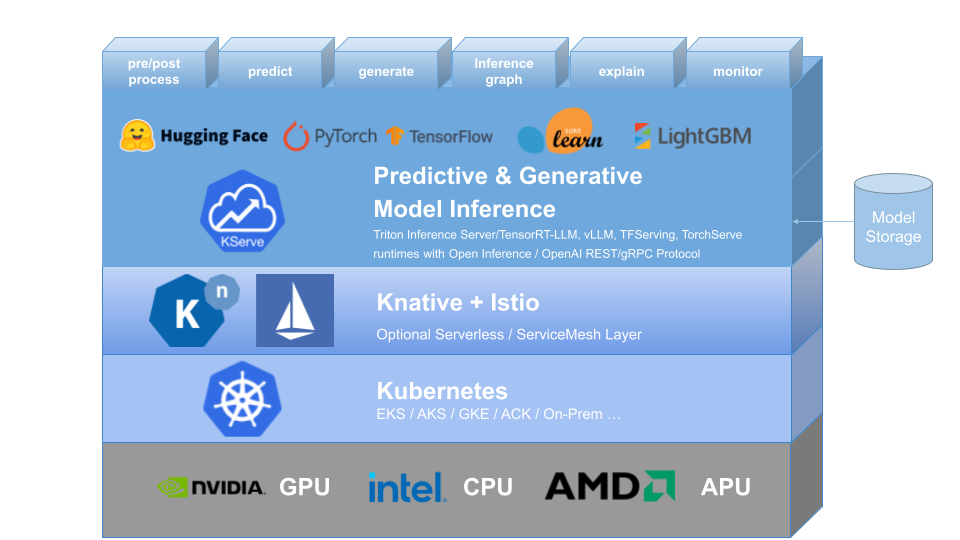
Deploying a trained model is often harder than training it. You need an API endpoint, autoscaling, health checks, request batching, and a way to handle both lightweight predictive models and heavyweight generative ones — without writing bespoke infrastructure for each. KServe solves this by giving you a standard, Kubernetes-native way to serve models of any kind.
This post walks through what KServe is, how it's architected, and how to install it and deploy your first models.
Prerequisites
kubectl— configured with access to a Kubernetes clusterhelm(v3+)- A Kubernetes cluster (local via kind/minikube, or a managed cluster)
What Is Model Serving?
Model serving is the process of taking a trained model and making it usable in production. At a high level, it involves:
- Loading the model into memory so it's ready to handle requests
- Exposing an API endpoint (HTTP or gRPC) that clients can call
- Handling the request lifecycle — preprocessing input, tokenization, running inference, and postprocessing output
- Managing operational concerns — batching concurrent requests, health checks, and graceful restarts/rollouts Serving needs differ significantly depending on the type of model:
| Predictive Models | Generative Models | |
|---|---|---|
| Output | A single output per input (e.g. a class label, a score) | A stream of tokens, generated one at a time until an end token |
| Resource usage | Typically lightweight, CPU-friendly | Compute-heavy, usually GPU-bound, and latency-sensitive due to streaming |
This distinction matters because a serving platform built only for one type (say, small scikit-learn models) won't scale well to something like an LLM — and vice versa.
Why KServe?
A few realities make model serving on Kubernetes genuinely hard to do by hand:
- Models are resource-hungry. GPUs and large memory footprints are the norm, especially for generative models.
- Scale is unpredictable. Traffic can spike or drop suddenly, and you need to scale (including to/from zero) without manual intervention.
- You rarely run just one model. Most real deployments serve many models, often of different frameworks and formats.
- Open-weight models don't simplify serving. Downloading a model from Hugging Face is the easy part — production-grade serving (batching, routing, autoscaling, observability) is still on you.
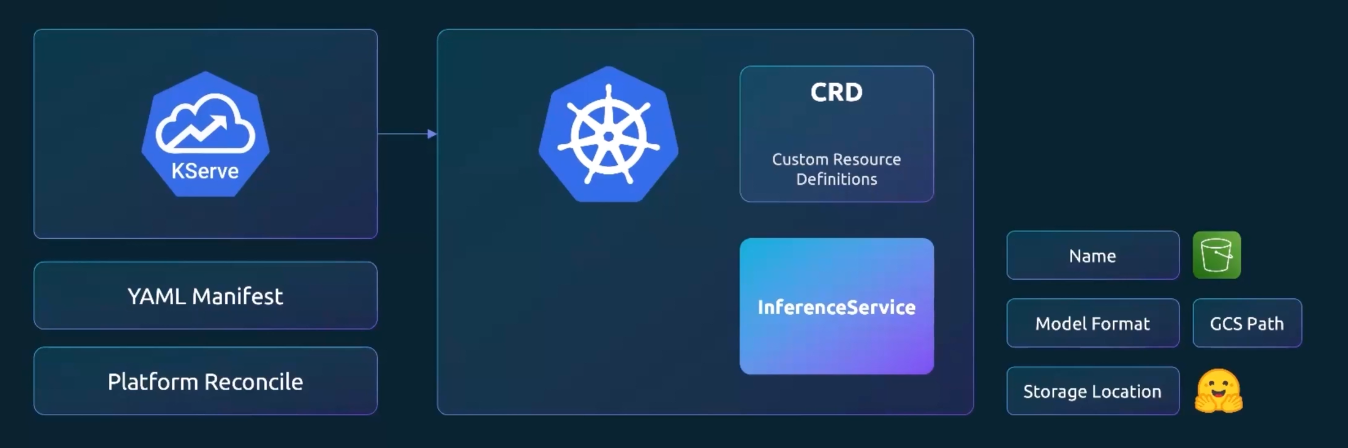
KServe addresses this by providing a Kubernetes Custom Resource Definition (CRD),
InferenceService, that abstracts away the deployment details. You describe what you want to serve; KServe handles how.
Kserve Architecture
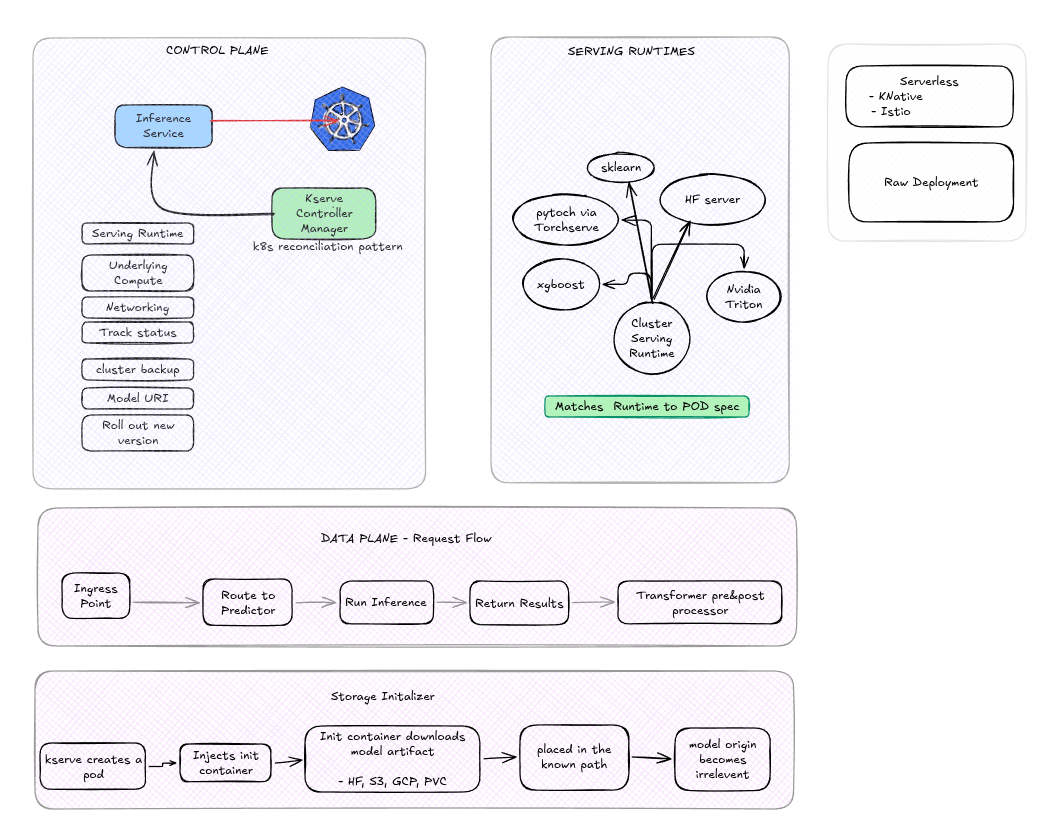
KServe sits on top of Kubernetes and (optionally) a service mesh/ingress layer, and is built around a controller that reconciles InferenceService resources into running deployments.
Core components:
Installation
KServe is installed via Helm in three layers: CRDs, the core controller, and runtime configs.
# kserve-crds:: Core KServe CRDs ( InferenceService, TrainedModel )
helm install kserve-crd oci://ghcr.io/kserve/charts/kserve-crd --version v0.19.0

# custom resource definitions:: LLM-specific LLMInferenceService
helm install kserve-llmisvc-crd oci://ghcr.io/kserve/charts/kserve-llmisvc-crd --version v0.19.0

# install kserve
# -- no Istio Service mesh or ingress controller::  avoids requiring Istio/Knative — runs as plain Kubernetes Deployments
helm install kserve oci://ghcr.io/kserve/charts/kserve-resources --version v0.19.0 --namespace kserve --create-namespace --set kserve.controller.deploymentMode=RawDeployment
Verify the controller is up
# Check Status
kubectl rollout status deployment/kserve-controller-manager -n kserve

# install runtime configs
# - servingruntime.enabled=true ;; Serving runtimes are opt-in
helm install kserve-runtime-configs oci://ghcr.io/kserve/charts/kserve-runtime-configs \
    --version v0.19.0 \
    --namespace kserve \
    --set kserve.servingruntime.enabled=true \
    --set kserve.controller.gateway.disableIstioVirtualHost=true \
    --set kserve.controller.gateway.disableIngressCreation=true

helm status kserve-runtime-configs -n kserve
helm get all kserve-runtime-configs -n kserve

kubectl get pods -n kserve

kubectl get crds | grep kserve
kubectl get clusterservingruntimes
Deploying Your First Models
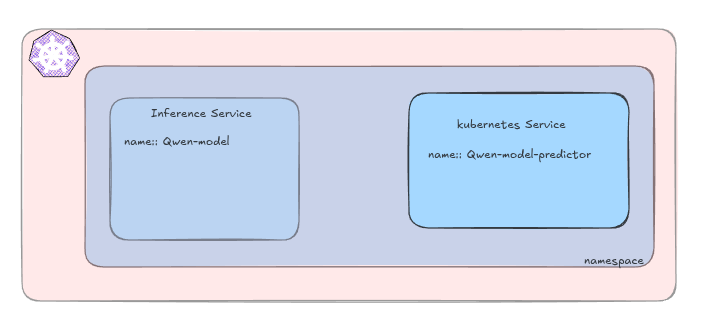
- Namespace
kserve-inference namespace created.
# kserve_ns.yaml
apiVersion: v1
kind: Namespace
metadata:
name: kserve-inference- Qwen2 model as generative-model example.
# qwen2_small.yaml
apiVersion: serving.kserve.io/v1beta1
kind: InferenceService
metadata:
    name: qwen-model
    namespace: kserve-inference
spec:
    predictor:
        model:
            modelFormat:
                name: huggingface
            storageUri: "hf://Qwen/Qwen2.5-0.5B-Instruct"
            args:
                - --backend=huggingface
            resources:
                requests:
                    cpu: "1"
                    memory: "2Gi"
                limits:
                    cpu: "2"
memory: "6Gi"- Sklearn Iris model as predictive model example.
# iris.yaml
apiVersion: serving.kserve.io/v1beta1
kind: InferenceService
metadata:
    name: sklearn-iris
    namespace: kserve-inference
spec:
    predictor:
        model:
            modelFormat:
                name: sklearn
            storageUri: https://storage.googleapis.com/kfserving-examples/models/sklearn/1.0/model/model.joblib
The KServe controller watches InferenceService objects, picks the matching ClusterServingRuntime for the model format, provisions the necessary compute, wires up networking, and reports status back — following the standard Kubernetes reconciliation pattern.
# Wait for the model to become ready
kubectl wait --for=condition=Ready --timeout=10m inferenceservice/sklearn-iris -n kserve-test
kubectl describe pod/PODSNAME -n kserve-test
kubectl get deployment,service -n kserve-test

# port forwarding
kubectl port-forward -n kserve-test svc/sklearn-iris-predictor 8080:80


# check
kubectl get inferenceservice qwen-model -n kserve-inference
kubectl get pods -n kserve-inference -w
Calling the Inference API
KServe's generative model runtimes expose an OpenAI-compatible chat completions endpoint:
POST /openai/v1/chat/completion
- modelname
- list_of_messages
- max_tokens

# call api
curl -s http://localhost:8080/openai/v1/chat/completions -H "Content-Type: application/json" -d '{"model":"qwen-model", "messages":"{"role":"user","content":"What is Kserve?"}", "max_tokens":100 }' | jq
Uninstall
helm uninstall kserve --namespace kserve
helm uninstall kserve-runtime-configs --namespace kserve
helm uninstall kserve-crd
helm uninstall kserve-llmisvc-crd
Conclusion
KServe gives you a single, declarative interface (InferenceService) for serving both lightweight predictive models and heavyweight generative ones on Kubernetes — without hand-rolling autoscaling, batching, or health-check logic yourself. Once the controller and runtimes are installed, deploying a new model is often just a matter of writing a short YAML manifest pointing at a model artifact.