k8S ❤️ KServe
Let's Serve better with KServe Deploying a trained model is often harder than training it. You need an API endpoint, autoscaling, health checks, request batching, and a way to handle both lightweight predictive models and heavyweight generative ones — without writing bespoke infrastructure for each. KServe solves this by giving you a standard, Kubernetes-native way to serve models of any kind. This post walks through what KServe is, how it’s architected, and how to install it and deploy your first models. Model serving is the process of taking a trained model and making it usable in production. At a high level, it involves: This distinction matters because a serving platform built only for one type (say, small scikit-learn models) won’t scale well to something like an LLM — and vice versa. A few realities make model serving on Kubernetes genuinely hard to do by hand: KServe sits on top of Kubernetes and (optionally) a service mesh/ingress layer, and is built around a controller that reconciles Core components: KServe is installed via Helm in three layers: CRDs, the core controller, and runtime configs. The KServe controller watches KServe’s generative model runtimes expose an OpenAI-compatible chat completions endpoint: KServe gives you a single, declarative interface (Table Of Content
Serving ML Models on Kubernetes with KServe
Prerequisites
kubectl — configured with access to a Kubernetes clusterhelm (v3+) What Is Model Serving?
Predictive Models Generative Models Output A single output per input (e.g. a class label, a score) A stream of tokens, generated one at a time until an end token Resource usage Typically lightweight, CPU-friendly Compute-heavy, usually GPU-bound, and latency-sensitive due to streaming Why KServe?
InferenceService, that abstracts away the deployment details. You describe what you want to serve; KServe handles how. Kserve Architecture
InferenceService resources into running deployments.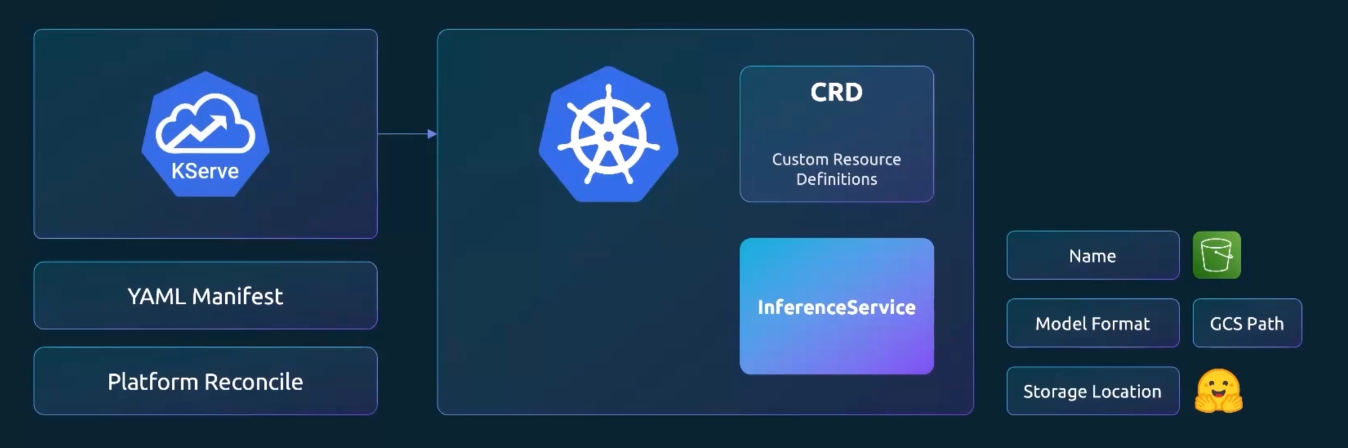
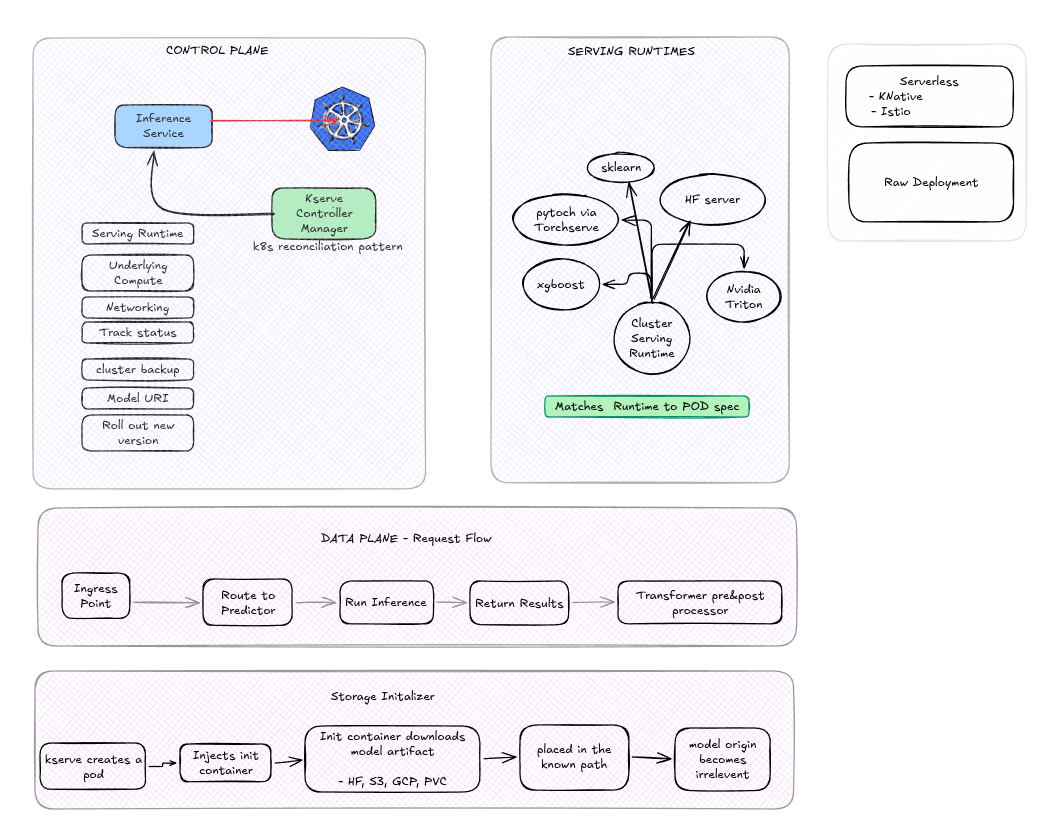
Installation
# kserve-crds:: Core KServe CRDs ( InferenceService, TrainedModel )
helm install kserve-crd oci://ghcr.io/kserve/charts/kserve-crd --version v0.19.0

# custom resource definitions:: LLM-specific LLMInferenceService
helm install kserve-llmisvc-crd oci://ghcr.io/kserve/charts/kserve-llmisvc-crd --version v0.19.0

# install kserve
# -- no Istio Service mesh or ingress controller::  avoids requiring Istio/Knative — runs as plain Kubernetes Deployments
helm install kserve oci://ghcr.io/kserve/charts/kserve-resources --version v0.19.0 --namespace kserve --create-namespace --set kserve.controller.deploymentMode=RawDeployment
Verify the controller is up
# Check Status
kubectl rollout status deployment/kserve-controller-manager -n kserve

# install runtime configs
# - servingruntime.enabled=true ;; Serving runtimes are opt-in
helm install kserve-runtime-configs oci://ghcr.io/kserve/charts/kserve-runtime-configs \
    --version v0.19.0 \
    --namespace kserve \
    --set kserve.servingruntime.enabled=true \
    --set kserve.controller.gateway.disableIstioVirtualHost=true \
    --set kserve.controller.gateway.disableIngressCreation=true

helm status kserve-runtime-configs -n kserve
helm get all kserve-runtime-configs -n kserve

kubectl get pods -n kserve

kubectl get crds | grep kserve
kubectl get clusterservingruntimes
Deploying Your First Models
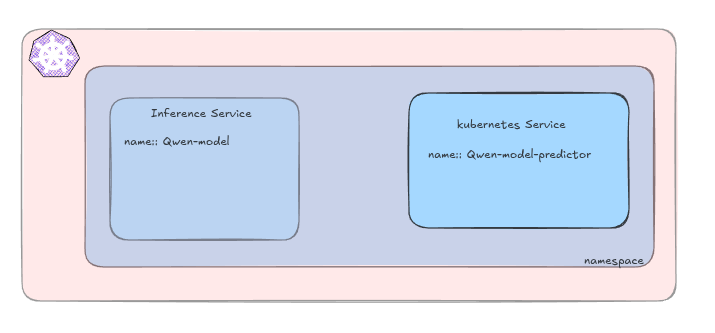
kserve-inference namespace created.# kserve_ns.yaml
apiVersion: v1
kind: Namespace
metadata:
name: kserve-inference# qwen2_small.yaml
apiVersion: serving.kserve.io/v1beta1
kind: InferenceService
metadata:
name: qwen-model
namespace: kserve-inference
spec:
predictor:
model:
modelFormat:
name: huggingface
storageUri: "hf://Qwen/Qwen2.5-0.5B-Instruct"
args:
- --backend=huggingface
resources:
requests:
cpu: "1"
memory: "2Gi"
limits:
cpu: "2"
memory: "6Gi"# iris.yaml
apiVersion: serving.kserve.io/v1beta1
kind: InferenceService
metadata:
name: sklearn-iris
namespace: kserve-inference
spec:
predictor:
model:
modelFormat:
name: sklearn
storageUri: https://storage.googleapis.com/kfserving-examples/models/sklearn/1.0/model/model.joblib# bert-classifier.yaml
apiVersion: serving.kserve.io/v1beta1
kind: InferenceService
metadata:
name: sentiment-classifier
spec:
predictor:
model:
modelFormat:
name: huggingface
storageUri: hf://distilbert/distilbert-base-uncased-finetuned-sst-2-english
args:
- --model_name=sentiment-classifier
- --task=sequence_classification
- --backend=huggingface
- --return_probabilities
resources:
requests:
cpu: 1
memory: 2Gi
limits:
cpu: 2
memory: 4Gi
InferenceService objects, picks the matching ClusterServingRuntime for the model format, provisions the necessary compute, wires up networking, and reports status back — following the standard Kubernetes reconciliation pattern.# Wait for the model to become ready
kubectl wait --for=condition=Ready --timeout=10m inferenceservice/sklearn-iris -n kserve-test
kubectl describe pod/PODSNAME -n kserve-test
kubectl get deployment,service -n kserve-test
# port forwarding
kubectl port-forward -n kserve-test svc/sklearn-iris-predictor 8080:80
# check
kubectl get inferenceservice qwen-model -n kserve-inference
kubectl get pods -n kserve-inference -w Calling the Inference API
# Generative
POST /openai/v1/chat/completion
- modelname
- list_of_messages
- max_tokens

# Predictive
POST /v2/models/MODEL_NAME/infer
- name
- shape
- data-type
- data


# call api
curl -s http://localhost:8080/openai/v1/chat/completions -H "Content-Type: application/json" -d '{"model":"qwen-model", "messages":"{"role":"user","content":"What is Kserve?"}", "max_tokens":100 }' | jq

curl -s http://localhost:8080/v2/models/sentiment-classifier/infer -H "Content-Type: application/json" -d '{"inputs": [{"name": "input-0","shape": [1],"datatype": "BYTES","data": This course was delightful. The labs taught me how to serve ML models and query them."]}]}' | jq .
Uninstall
helm uninstall kserve --namespace kserve
helm uninstall kserve-runtime-configs --namespace kserve
helm uninstall kserve-crd
helm uninstall kserve-llmisvc-crd
Conclusion
InferenceService) for serving both lightweight predictive models and heavyweight generative ones on Kubernetes — without hand-rolling autoscaling, batching, or health-check logic yourself. Once the controller and runtimes are installed, deploying a new model is often just a matter of writing a short YAML manifest pointing at a model artifact.