Git in Practical - Intermediate
Let's commit it Distributed version control systems combine the capabilities of local and remote systems. Developers can store the entire codebase locally, allowing independent work and offline changes. Developers then synchronize their local changes to a central server for other collaborators to consume. where as, GitHub is a cloud-based service that hosts Git repositories (Centralized Platform) config file loaded fron Git is a conflict markers When you are in the middle of something, your boss comes in and demands that you fix something immediately. Traditionally, you would make a commit to a temporary branch to store your changes away, and return to your original branch to make the emergency fix, like this: creates a new commit that undoes a previous one — safe for shared/remote branches since it doesn’t rewrite history Reset current HEAD to the specified state git restore is a focused command for discarding working tree changes or unstaging files Rebase replays commits on top of another base — producing a linear history. Preferred over merge in feature-branch workflows. it records every movement of HEAD, even across resets, rebases, and deleted branches. Entries expire after 90 days by default. Helps to find the exact commit that introduced a bug Include another repository inside your project using git submodule or git subtree.Table Of Content
Introduction
Installation
# GIT
sudo apt update && sudo apt install git
git --version
# GIT LFS
sudo apt-get install git-lfs
git lfs install
Configuration
~/.gitconfig or ~/.config/git/ dir[user]
name = USER_NAME
email = USER_MAIL
[core]
editor = code --wait
[init]
defaultbranch = main
[log]
decorate = full
[rerere]
enabled = false
[advice]
forcedeletebranch = true
[alias]
lol= "!git --no-pager log --oneline --decorate --graph --parents"
wdiff = diff -w --word-diff=color --ignore-space-at-eol
ss = status -bsv
[commit]
verbose=true Global/Local Namespace
--global adding config in global space
--local adding config in local git-space levelgit config --global user.name "Your name"
git config --global user.email "email@domain.com"
git config --global core.editor "code --wait"
git config --global init.defaultbranch main
git config --global log.decorate full
git config --global rerere.enabled false
git config --global advice.forcedeletebranch true
# set
git config --add --local webflyx.tone Black
git config --add --local webflyx.status Married
git config --add --local webflyx.status FamilyMan
# unset
git config --unset --local webflyx.tone
# unset-all
git config --unset-all --local webflyx.status
# remove section
git config --remove-section webflyx Git Tracks content
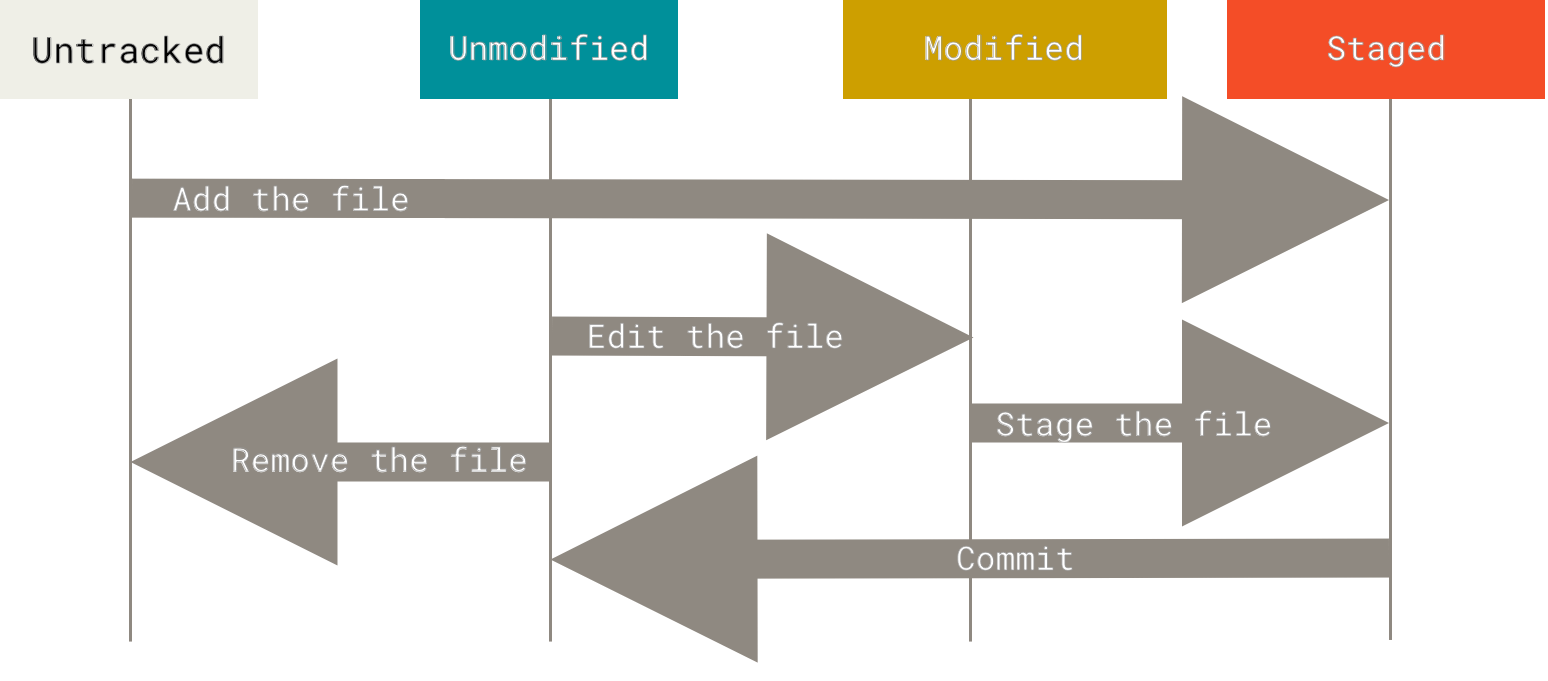
content tracking system. The Git Object store is based on the hashed computation of the content of its object not on the file or dir names Example,System Index Mechanism Data Store Data Base Indexed Sequential Access Method Data Records Git .git/objects/hash, tree object contentsBlob Objects, tree objects .git/
├── branches
├── config
├── description
├── HEAD
├── hooks
│__ ├── applypatch-msg.sample
│__ ├── commit-msg.sample
│__ ├── fsmonitor-watchman.sample
│__ ├── post-update.sample
│__ ├── pre-applypatch.sample
│__ ├── pre-commit.sample
│__ ├── pre-merge-commit.sample
│__ ├── prepare-commit-msg.sample
│__ ├── pre-push.sample
│__ ├── pre-rebase.sample
│__ ├── pre-receive.sample
│__ ├── push-to-checkout.sample
│__ ├── sendemail-validate.sample
│__ └── update.sample
├── info
│__ └── exclude
├── objects
│__ ├── info
│__ └── pack
└── refs
├── heads
└── tags initalize
git init
touch README.md && git add .
git commit -m 'Initial commit'

git clone <url>
git clone -b --single-branch rbranch <url>   # git branch -a && git checkout <remote-branch>
git clone <url> <dir>   # Clone particular folder in the Repo
git clone --depth=1 <url> # bring only one commit
git clone --mirror <repository-url>  # mirror


# Adding to repo
git remote add origin <url>
git remote -v # details about push/pull
git remote set-url origin  <new-url>   # origin sets upto new url
git push -u <origin/REMOTE-NAME> <local-branch-name>:<remote/origin>      # -u make it upstream
git push -d <branch> # delete the branch
Log
git --no-pager log --oneline --decorate --graph --parents --all
git show <commit-hash>  # Examine commit
git show HEAD
branching
git switch <existing-branch>
git switch -c <new-branch>
git branch
git branch -a
git branch -r
git branch -d <branch-name>  # keep git history
git branch -D <branch-name>  # remove git history
update only the latest commit
git commit --amend -m 'Updated commit message' # update only the message

# Forget file in the commit
git add <file(s)>
git commit --amend --no-edit

# Undo the Last commit
git reset --soft HEAD~1  # --soft option is useful if u want to go back to prev commit, but keep all of your changes. Committed changes will be uncommited and staged, while uncommitted changes will remain staged or unstaged as before.

git reset --hard HEAD~1 # delete it from the staging area as well.
Tag
git tag # list all tags
git show tag-no.
git tag -a tag-no # with annotated-message
git push --tags  # push only tags
git push origin tag-no # push only that tag
git tag tag-no commit-hash
git tag -d tag-noo

git tag -a v1.0.0 -m 'Release 1.0.0' # RECOMMENDED WAY


git push origin v1.0.0 # push specific tag
git push origin --tags # push all tags
git push origin --delete v1.0.0 # delete remote tag
Merge
<<<<<<< HEAD
  Changes introduced by the main branch
======
  Changes introduced by the widgets branch
>>>>>>> branch
git merge --abort
git switch <main> && git merge branch # --ff --no-ff --ff-only
git merge --squash/--no-squash # in the branch do squash and merge Fetch
# git push uploads commits from a local repository to a remote repository, while git fetch downloads commits.

# git pull = git fetch + merge

git fetch origin main -v
git switch main
git merge origin/main   # git rebase origin/main
stash
- ... hack hack hack ...
- $ git switch -c my_wip
- $ git commit -a -m "WIP"
- $ git switch master
- $ edit emergency fix
- $ git commit -a -m "Fix in a hurry"
- $ git switch my_wip
- $ git reset --soft HEAD^
- ... continue hacking ...
- ... hack hack hack ...
- $ git stash
- $ edit emergency fix
- $ git commit -a -m "Fix in a hurry"
- $ git stash pop
- ... continue hacking ...git stash -u # stash untracked file as well -m ""
git stash show
git stash pop
git stash apply stash@{2} # git stash pop --index 2
git stash drop stash@{2}
git stash clear # clear all Revert
git revert <commit-hash>          # undo a specific commit (opens editor)
git revert <commit-hash> --no-edit  # skip the editor, use default message
git revert HEAD                   # undo the last commit
git revert HEAD~3..HEAD           # revert a range (newest to oldest)
git revert -n <commit-hash>       # stage the revert without committing (--no-commit)
git revert --continue             # after resolving revert conflicts
git revert --abort                # abandon the revert mid-way
Note: If you pushed changed been revert, no merge conflict will happen 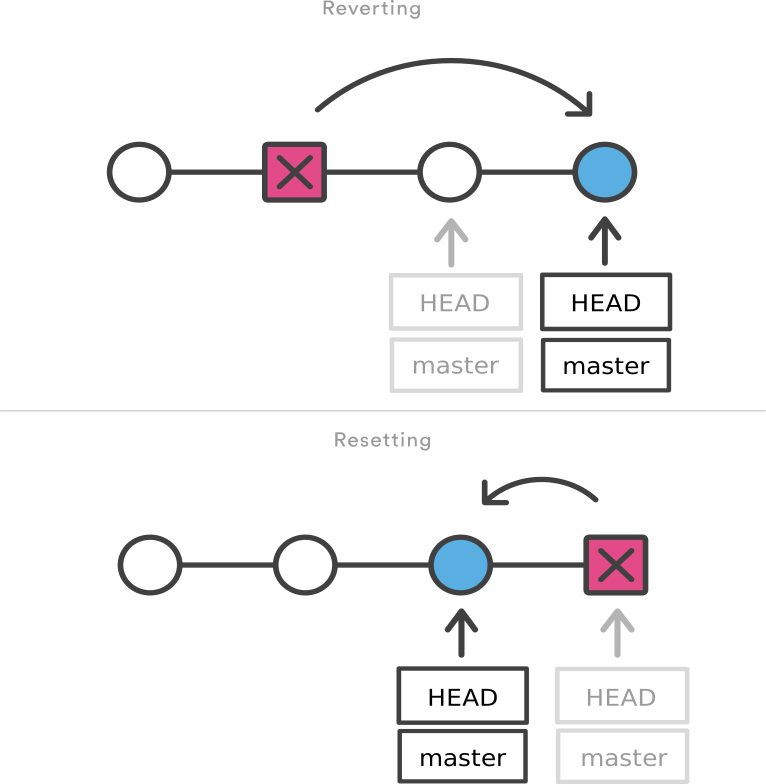
Reset
Note: Never use git reset on commits already pushedgit reset --hard COMMISH # clears the mess from the index file and the working tree.
git reset --soft COMMISH # leaves all your changed files Restore
# Discard working directory changes (unstaged)
git restore <file>                        # restore file to last commit state;;  Git will retrieve the state of these file(s) from the HEAD commit, and revert them back to that version

git restore .                             # restore all modified files

# Unstage a file (move from index back to working tree)
git restore --staged <file>               #  you accidentally add file to stage then wanna remove;; equivalent to: git reset HEAD <file>

git restore --staged .                    # unstage everything

# Restore from a specific source
git restore --source <commit-hash> <file> # restore file from any commit
git restore --source HEAD~2 config.yaml   # example: go back 2 commits for a file
git restore --source origin/main <file>   # restore to remote state
Rebase
                                       H---I---J topicB
                                      /
                             E---F---G  topicA
                            /
               A---B---C---D  master

git rebase --onto master topicA topicB

                            H'--I'--J'  topicB
                           /
                           | E---F---G  topicA
                           |/
               A---B---C---D  master
git rebase --onto <source-branch> <topic-branch> # play topic commit one-by-one onto source
# remove conflicts
git rebase --continue
git rebase --abort
### Interactive
git rebase -i HEAD~3 # range of HEAD Reorder
git rebase -i HEAD~2
# reorder as you need & Be careful when performing this step. Accidentally deleting a `commit line` will cause Git to destroy the commit.

# line order only changes below

pick 7f9d4bf Updated README            ->  pick 3f8e810 Accessibility fix
pick 3f8e810 Accessibility fix         ->  pick 7f9d4bf Updated README
Pick
# p, pick <commit> = use commit
# nothing changes
`pick` 7f9d4bf E:Accessibility fix       -> `pick` 7f9d4bf    E:Accessibility fix
`pick` 3f8e810 F:Updated screenreader    -> `pick` 3f8e810  F:Updated screenreader
Squash
# s, squash <commit> = use commit, but meld into previous commit

pick 7f9d4bf E:Accessibility fix       -> pick 7f9d4bf    E:Accessibility fix
`pick` 3f8e810 F:Updated screenreader  -> `squash` 3f8e810  F:Updated screenreader
`pick` ec48d74 G:Added comments        -> `squash` ec48d74  G:Added comments
A <- B <- C <- D <- E <- F <- G
git rebase -i HEAD~3
A <- B <- C <- D
^-- E={E+F+G} Split
# splitting
# use commit, but stop for amending

pick 7f9d4bf E:Accessibility fix         -> pick 7f9d4bf    E:Accessibility fix
`pick` 3f8e810 F:Updated screenreader    -> `edit` 3f8e810  F:Updated screenreader
`pick` ec48d74 G:Added comments          -> `pick` ec48d74  G:Added comments


Stopped at 3f8e810...  F:Updated screenreader

# OUR Untracked File
# untrack1.cs untrack5.cs untrack4.cs untrack3.cs untrack2.cs

git add untrack1.cs untrack2.cs untrack3.cs untrack4.cs && git commit -m "Added untrack-files"
git add untrack5.cs && git commit -m "Fixed bug untrack-files"
git rebase --continue


$ git log --oneline --no-pager
A <- B <- C <- D <- E <- F <- "Added untrack-files" <- "Fixed bug untrack-files" <- "G"
Reword
Note: # most recent commit's message use --amendgit rebase -i HEAD~2
pick 7f9d4bf Frontpag bug fiz -> reword 7f9d4bf Frontpag bug fix
pick 3f8e810 Refactored navbar -> pick 3f8e810 Refactored navbar
# Commit message Delete
# d, drop <commit> = remove commit

git rebase -i HEAD~3
# delete it
pick 2f8e823 Refactored                         -> pick 2f8e823 Refactored
pick 7f9d4bf Updated README                     -> drop 7f9d4bf Updated README
pick 3f8e810 Accessibility fix                  -> drop 3f8e810 Accessibility fix
Cherry pick
git cherry-pick -e <commit-hash> # Cherry-pick and edit commit message
git cherry-pick <commit-hash> # Cherry-pick single commit
# Cherry-pick multiple commits
git cherry-pick <commit1> <commit2>
git cherry-pick <commit1>..<commit2>
Reflog
Bisect
Submodules
Advance commands
git gc # Garbage collection
git fsck # Verify repository integrity
git repack -ad  # Optimize repository
git prune  # Prune unreachable objects
git count-objects -vH # Show repository size
git blame file.txt  # Show who changed each line of file
git clean -n # Show what would be removed
git clean -f # Remove untracked files
git clean -fd # Remove untracked files and directories
git clean -fdx # Remove ignored files as well
git clean -i # Interactive clean
NOTES::
`git reset --hard` discards both staged and unstaged changes permanently — no undo. :(

1. `git fsck --lost-found --full --no-reflogs --unreachable`
2. cd `.git/lost-found/`

Checking object directories: 100% (256/256), done.
- unreachable blob `4413d81d94e76ea9a7f7741786f63426d71d297a`
- unreachable blob `e613e50292dd773b7e829f598d58e6d419301ec1`
- unreachable tree 4b825dc642cb6eb9a060e54bf8d69288fbee4904

git show --stat `4413d81d94e76ea9a7f7741786f63426d71d297a` > recovery-file-a.txt
git show --stat `e613e50292dd773b7e829f598d58e6d419301ec1` > recovery-file-a.txt
Running `git checkout <commit-hash>` moves HEAD directly to a commit instead of a branch,
so any new commits won't belong to any branch.
before-leaving `git checkout -b new-branch-name`, to keep work done in detached HEADrevoke and rotate exposed credentials
`git filter-branch --force --index-filter 'git rm --cached --ignore-unmatch .env' HEAD`
clean the history`git push origin --force --all`Never do `git push --force` overrites others work. Use `--force-with-lease` at minimum.
1. pull `git pull origin main`
2. resolve `merge conflict`
3. push `git push origin main`
1. rebase it `git pull --rebase origin main`
To globally configure use, `git config --global pull.rebase true`1. `git commit --amend -m 'Correct message here'`
2. if already pushed then do `git push --force-with-lease`look in `git reflog` for the last commit msg on the deleted branch and recreate using `git checkout -b recovered-branch <sha>``git add forgetten-file` and do `git commit --amend --no-edit`.
If it's pushed then `git push --force-with-lease`No reset, do revert.git rev-list --objects --all | sort -k2 | tail -20git rm -r --cached node_modules/git commit --allow-empty -m "chore: retrigger CI build"git commit --no-verify #Git hook bypass